8 Modulation
Modulation moves parameters for you while you play. A rack of up to eight modules, such as LFOs, envelopes and random sources, makes control signals, and up to 32 cables carry them to the parameters of any sound, any effect, the instrument’s pitch and level, or another module. Every note can restart an envelope; an LFO can sweep a filter in time with the sequencer; a random source can vary each note a little. A cable can also run per voice: each note of a chord then has an envelope or an LFO of its own, which moves that note alone.
The rack works like a small modular synthesizer. Most of its modules are Lunar Modulator’s own code after published designs, chiefly Mutable Instruments’ Peaks and Braids (Emilie Gillet), Schwung’s LFO (Charles Vestal), DaisySP’s sample and hold (Electrosmith) and Music Thing Modular’s Turing Machine and Workshop System cards (Tom Whitwell, Matt Allison); three are ports of Peaks’ and Braids’ code, under the MIT licence (chapter 14).
In the simulator
The rack, the cables and their pages run in the browser simulator and in the desktop tools, and are planned for the FM-1 with the same controls. Modulation per voice reaches the sounds that keep a value for each note: Macro, Macro Heavy, Shapes, Six-Op FM, FM6 and Drums (Per voice).
8.1 How modulation works
Status:In the simulatorOn the desktopPlanned for the device
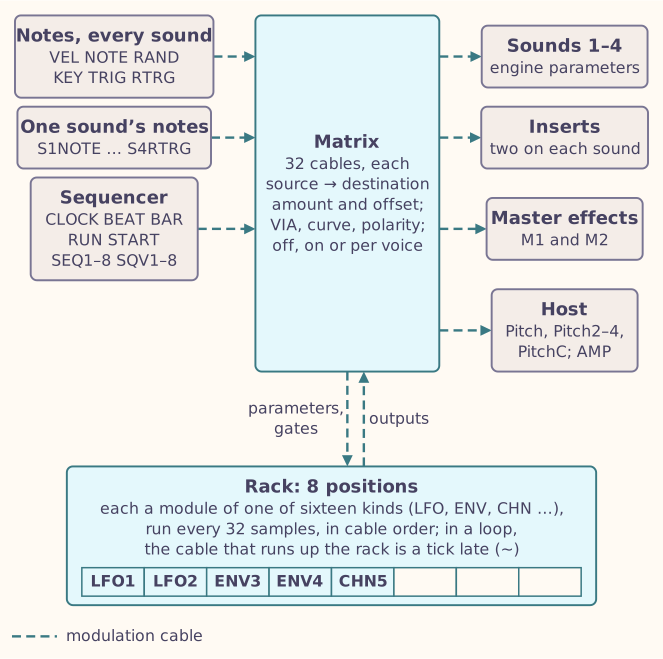
8.1.1 The rack
The rack has eight positions. Each holds a module or nothing. A module is named by the abbreviation of its kind and its position: LFO1 is an LFO in position 1, ENV3 an envelope in position 3, CHN5 a Chance module in position 5.
The simulator starts with this rack:
| Position | 1 | 2 | 3 | 4 | 5 | 6 | 7 | 8 |
|---|---|---|---|---|---|---|---|---|
| Module | LFO1 | LFO2 | ENV3 | ENV4 | CHN5 (Chance) |
and two cables: the note gate RTRG into the GATE of both envelopes, so every note, on any sound, restarts them. Re-patch or delete those cables as you like (The matrix); an envelope with no cable into its GATE restarts at every note too.
8.1.2 Cables
A cable runs from a source to a destination:
- Sources are the modules’ outputs (LFO1, ENV3, CHN5.2 for its second output), the notes and the sequencer:
| Source | What it gives |
|---|---|
| VEL, NOTE, RAND | The last note’s velocity and pitch, and a random value drawn at each note |
| KEY, TRIG, RTRG | High while a note is held; a short pulse at each note; KEY that drops and rises again at each new note |
| CLOCK, BEAT, BAR | A pulse at each sequencer step, beat and bar |
| RUN, START | High while the sequencer plays; a pulse when it starts |
| SEQ1 to SEQ8, SQV1 to SQV8 | High while sequencer track 1 to 8 sounds a note; its last velocity |
| S1NOTE to S4RTRG | NOTE, VEL, KEY, TRIG and RTRG for the notes of one sound only: S2KEY is high while Sound 2 holds a note, S1VEL is Sound 1’s last velocity |
The plain note sources follow the notes of every sound, from the keys, MIDI and the sequencer; the ones that start with a sound’s number follow that sound’s notes alone.
- Destinations are the parameters of the four sounds that take modulation, their insert effects, the two master effects, the host’s pitches and AMP (the level before the limiter), and the parameters and gate inputs of the modules. The host has a pitch for each sound, Pitch for Sound 1 and Pitch2 to Pitch4, each added to that sound’s pitch bend, and PitchC, which bends whichever sound is current: choose another sound and the cable follows it.
A cable has an amount from −100 % to +100 % of the destination’s range, and an offset added to the source first. Page B of the matrix adds a VIA source that scales the amount (a second LFO varying the depth of the first, say), a curve (lin, square, cube, root, cbrt, exp, log or s), a polarity (auto, uni, bi or inv) and its state: off, on, or on per voice.
8.1.3 What you hear
Each parameter has a base: the value its knob, or a parameter lock (chapter 7), sets. Modulation adds what its cables give to the base, and the sum stays inside the parameter’s range. Turning the knob moves the base; the cables keep moving around it.
- A list parameter, such as an LFO’s Shape, moves from entry to entry.
- A frequency or a time on an effect, such as a cutoff or a delay, moves in octaves, as its knob turns in ratios (chapter 6): a cable at 100 % can take it across its whole range, and NOTE at +100 % into a cutoff makes it follow the keyboard exactly, twice the frequency for a note an octave higher.
- Parameters that cannot take modulation say so: those that cut or restart every sounding note when they change, such as Macro’s Model.
- A parameter with no cable is never touched, so a sound with no cables sounds exactly as it would without modulation.
- Modulation is worked out every 32 samples, about 1,400 times a second, and the effects follow it within each block.
8.1.4 Gates
Some inputs are gates: an envelope’s GATE, an LFO’s RESET, a Chance module’s TRIG. A gate is high or low, and its edges, its rises and falls, start things. A gate input with no cable listens to the notes: an envelope’s GATE follows RTRG, so every note restarts it, and an LFO’s RESET follows TRIG. A cable into it replaces that: from KEY, an envelope plays legato, rising once for overlapping notes.
- A continuous source into a gate rises at half way and falls below a quarter.
- A gate cable at less than 100 % lets each rise through with that probability: a chance of a trigger.
- Several cables into one gate combine: the gate is high while any is.
8.1.5 Loops
A module can modulate another, and cables can run in a loop. The rack works through its modules in an order that lets a chain of modules arrive in one step; inside a loop, the cable that runs up the rack reads its source’s value from the step before. The matrix and the rack mark such a cable with ~.
8.2 The gesture: making a cable with a knob
Status:In the simulatorPlanned for the device
The quickest way to modulate a parameter:
- Show the parameter on the screen: the sound’s page, an effect’s page in FX mode (chapter 6), or a module’s page in the rack.
- Hold LFO (or ENV).
- Turn the parameter’s knob, KNOB1 to KNOB4. A cable now runs from the LFO (or envelope) the rack last showed, LFO1 or ENV3 at first, to that parameter, and its amount follows the turn, 1 % a click. The screen names the cable and its amount in a band at the bottom, such as LFO1 > S2 Color +12%.
- Let go of LFO.
Turn the knob again while you hold LFO to change the same cable’s amount; turn it back to 0 % to silence it. On the sound’s page the parameter is the current sound’s (chapter 5). Released without a turn, LFO or ENV is a tap, which opens the rack (below).
With a mouse
In the simulator, press Tab until LFO has the focus, hold Enter, and scroll over the knob.
8.3 The rack
Status:In the simulatorPlanned for the device
The screen calls the rack RACK. Tap LFO or ENV to show the rack at the LFO or envelope it showed last (LFO1 and ENV3 at first); tap it again to step to the next module of that kind. The button lights while the rack shows one of its modules. HOME, FX and GLO leave the rack.
The screen shows:
- The rack: eight cells, each filled to its module’s first output, an empty position hollow; a bar under a cell marks the one shown (gold while you move it).
- The module’s line, such as ENV3 2 out 1 in 1 late: the module, its cables out and in, and those that run a step late; 3 voices at the end says the module runs per voice, three voices now (Per voice).
- Four rows for the module’s parameters on KNOB1 to KNOB4, as on the sound’s page.
- The bottom bar, such as 1/2 Mod3: the page and the position.
| Control | In the rack |
|---|---|
| SELECT | Walks every page of every position |
| KNOB1 to KNOB4 | Change the module’s parameters |
| ALGORITHM | Opens the kind picker, such as Mod3 kind: Empty, then the sixteen kinds, the Resonator last, eight at a time (chapter 3). The choice takes effect a second after your last turn, or at once when you use another control |
| SEL | Picks up the module (the light and an asterisk show it), so that SELECT moves it along the rack; press again to put it down |
Changing a module’s kind switches off the cables that touch it, and remembers them: change it back and they switch on again, those whose other end is still there.
8.4 The matrix
Status:In the simulatorPlanned for the device
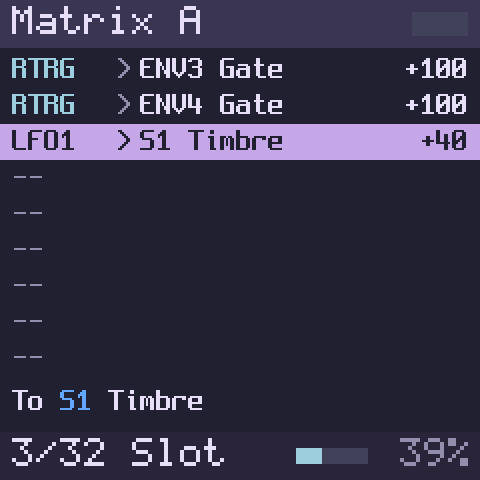
Press EDIT to show the matrix (MATRIX on the screen), the list of the 32 cables, nine at a time; press it again to go back to the sound’s page. EDIT is lit there.
Each row reads like this, the source in the modulation colour, the mark grey, the destination and the amount white, and a sound’s S1 to S4 in that sound’s colour, in a source such as S2RTRG too:
LFO1  >S1 Timbre         +40     the source, > (or ~ a step late), the destination, the amount
SEQ8  -M2 Ping-pong     -100     - a cable switched off, ! one refused
ENV3  vS1 Timbre         +60     v a cable per voice
ENV3  >S2 In1 Mix        +50     Sound 2's first insert
LFO2.2>ENV3 Gate        +100     a module's input
On the screen the mark stands a little apart from the source and from the destination, so a six-letter source such as S2RTRG never runs into it. A destination too long for its column keeps the parameter’s full name after a shorter tag, such as S1I2 High Xover. A switched-off row is grey and a refused one red, whole. Page B names the VIA source, the curve and the polarity in full (square, auto).
SELECT chooses the row. The hint line names the field you turned last, for two seconds, and otherwise the row’s destination in full; it is red while the chosen cable is refused.
| Page | KNOB1 | KNOB2 | KNOB3 | KNOB4 |
|---|---|---|---|---|
| A | Source; – empties the cable | Destination | Amount | Offset |
| B | VIA | Curve | Polarity | Off, on, or on per voice |
ALGORITHM turns between the two pages. Amount and offset move 1 % a click.
- A new cable starts on, at 0 %, from the LFO the rack shows, unless you chose a source with KNOB1 first.
- The destination picker. KNOB2 opens a list, Destination, of the destinations in full, such as S1 Timbre, S2 In1 Mix, M1 Mix, Host Amp or ENV3 Gate, eight at a time with the chosen one highlighted and each sound’s S1 to S4 in that sound’s colour (chapter 3). Destinations come in groups: each sound, its two inserts, the master effects, the host, and each module; a unit that is empty is left out. While the list is open, ALGORITHM jumps from group to group. On an empty cable the list opens at the current sound. The choice takes effect a second after your last turn, or at once when you use another control.
- When a sound’s engine changes, each cable into it moves to the new engine’s parameter of the same name: a cable into Timbre stays on Timbre from Macro to Shapes. When the new engine has no parameter of that name, the cable switches off and keeps its old destination, shown with -, until you choose an engine that has it again; then it comes back on. The same holds for the effects.
8.5 Per voice
Status:In the simulatorOn the desktopPlanned for the device
A sound plays several notes at once, each on a voice of its own. A cable switched on per voice (KNOB4 on page B of the matrix, turned past On) runs once for every voice:
- its note sources are that note’s own: VEL its velocity, NOTE its pitch, RAND a random value of its own, KEY and RTRG its gate (high from its note-on to its note-off), TRIG a pulse at its note-on, and the same for the note’s own sound’s sources (S1VEL on Sound 1’s notes, say; another sound’s, such as S2VEL there, is that sound’s last note);
- an Envelope, an LFO or a Chance module it reads runs once for every voice, starting at that note: each note of a chord has its own envelope, in its own attack, decay or release. Its gate, with no cable, is the note’s own;
- it moves that note alone: a parameter the sound keeps for each note (its Timbre or Color, say), or the note’s own pitch through Pitch to Pitch4 and PitchC.
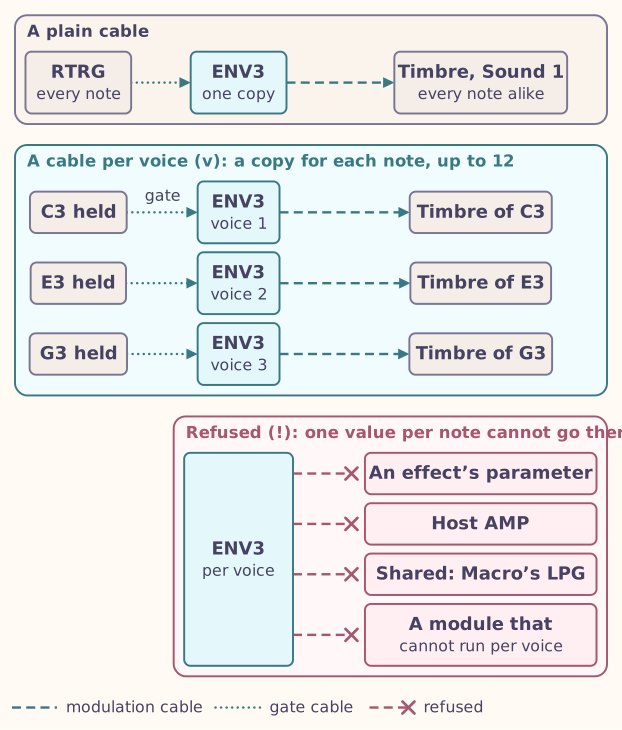
The row shows v. A cable per voice into something that is not kept for each note, such as an effect, the host’s AMP, a parameter that every note shares (Macro’s LPG) or a module that cannot run per voice, is refused and shows !: what each voice does cannot be sent to one place. A plain cable into a module that runs per voice moves every voice’s copy alike.
| Sound | Parameters each note keeps |
|---|---|
| Macro, Macro Heavy | Every continuous parameter (Speech keeps Harmonics shared) |
| Shapes | Timbre, Color, Attack, Release, Volume |
| Six-Op FM | Brightness, Envelope, Volume |
| FM6 | Brightness, Env Time, Feedback, Volume |
| Drums | Tune, Decay, Level, Tone, Snap, Sweep, Drive, Accent, Volume |
The rack follows up to twelve voices at once, the sounds’ own polyphony, shared by every sound that has a cable per voice; a thirteenth note takes the voice that was released longest ago, or else the oldest, and the note it came from keeps its last values. A voice runs on after its note-off, through its envelope’s release, and stops when its modules stop moving. Notes already held when you make a cable per voice join it at their next note-on. With many modules per voice the rack’s memory holds fewer voices; a note that loses its voice that way goes back to the values without the cable.
An envelope for each note
Hold ENV and turn KNOB3 on Macro’s first page: a cable from ENV3 into Timbre. Press EDIT (the matrix opens on it), turn ALGORITHM to page B and KNOB4 one click right: On per voice. Play a chord, one key after another: each note opens and closes on its own.
8.6 Chains
Status:In the simulatorPlanned for the device
In the matrix, press SEL to see the chain (CHAIN) through the chosen cable: the longest path of modules and cables it belongs to, one line for each module and one for each cable, such as LFO2 Wrap +1 and +100 >ENV3 Gate, in the matrix’s colours. The chosen cable is highlighted, +N counts a module’s other cables and ~ marks a cable that runs a step late; a refused cable is not followed. SELECT steps along the chain, and SEL goes back to the matrix. SEL and EDIT are lit in the chain.
8.7 Recipes
Status:In the simulatorOn the desktopPlanned for the device
Each patch below is a few ordinary cables in the matrix (The matrix): the source on KNOB1, the destination on KNOB2, the amount on KNOB3. A module’s parameters take cables like a sound’s, so modules can drive each other.
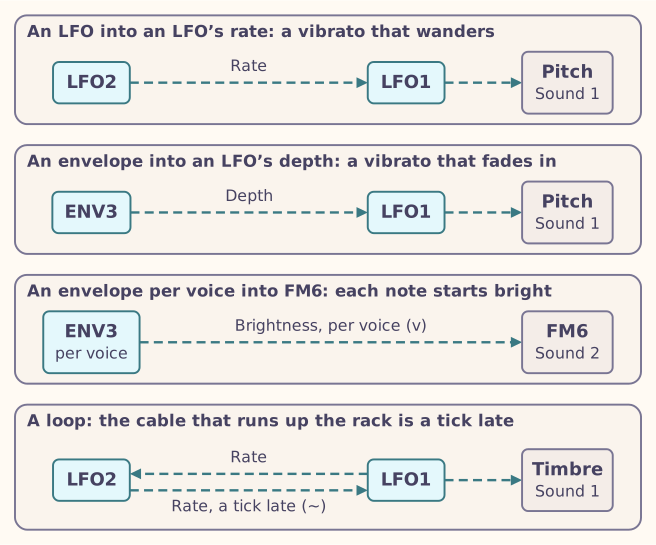
- A vibrato that wanders. Cable LFO1 into Host Pitch at +1 % (Pitch spans 96 semitones, so 1 % is about a semitone; LFO1’s Depth narrows it), then LFO2 into LFO1 Rate at +20 %: LFO2 now speeds LFO1 up and slows it down.
- A vibrato that fades in. Turn LFO1’s Depth to 0. Cable ENV3 into LFO1 Depth at +50 % and LFO1 into Host Pitch at +1 %. Every note restarts ENV3, whose attack opens the vibrato.
- Each FM6 note starts bright. With FM6 on Sound 2, cable ENV3 into S2 Brightness at +50 % and turn KNOB4 on page B to On per voice (Per voice): each note gets an envelope of its own, so a new note starts bright while the older ones have already darkened.
- A loop. Cable LFO1 into LFO2 Rate and LFO2 into LFO1 Rate, each at +30 %, and LFO1 into S1 Timbre: the two LFOs speed each other up and slow each other down. LFO2 sits further down the rack, so its cable back to LFO1 reads LFO2 a tick late and shows ~ (Loops).
8.8 What the pages show
Status:In the simulatorPlanned for the device
On every parameter page (the sound’s, an effect’s in FX mode, and a module’s in the rack) a parameter that cables reach shows:
- its name in the modulation colour (the light blue-green of the oscilloscope);
- a bracket in that colour on its bar, the base plus and minus the cables’ depth;
- a white tick at the value it has now, which moves as you listen.
8.9 The modules
Status:In the simulatorOn the desktopPlanned for the device
Sixteen kinds of module are available. The default rack uses the first three, which can also run per voice (Per voice).
| Kind | Name | What it does | Outputs |
|---|---|---|---|
| LFO | LFO | A low-frequency oscillator: eight shapes, free or restarted by notes, or in time with the sequencer | OUT; WRAP, a pulse at each cycle |
| Envelope | ENV | Attack, decay, sustain and release on a gate, or a looping or triggered shape | ENV; EOC at its end; ACT while it runs |
| Chance | CHN | Sample and hold, track and hold, a smooth random line, or a drift | HELD; SMTH, slewed; STEP at each new value |
| Function | FUN | A rise and a fall: an envelope, a cycling LFO or a slew to a target | OUT and five more |
| Bounce | BNC | A bouncing ball, dropped by each trigger | OUT; HIT at each bounce |
| Register | REG | A looping random shift register, from locked to random | CV; BIT; PITCH |
| Coin | COI | Sends each trigger to A or B, by chance | A, B |
| Divide | DIV | Divides, multiplies, swings or thins out a clock; Euclidean rhythms | OUT1, OUT2 |
| Burst | BST | Ratchets, delays and random repeats of a trigger | OUT, GATE, DONE |
| Slew | SLW | Smooths a signal, linear or exponential | OUT and five more |
| Quantize | QNT | Rounds a pitch to one of 49 scales | PITCH; CHG when it changes |
| Compare | CMP | Gates from comparing two signals, or a signal’s slope | GATE and six more |
| Logic | LOG | AND, OR, XOR and their opposites, flip-flops and a toggle on two gates | OUT, NOT |
| Calc | CLC | Arithmetic on two signals | OUT, INV |
| Mix | MIX | Mixes up to four signals | SUM, AVG, INV |
| Resonator | RES | A resonant filter for control signals, which a trigger can strike into a wobble | OUT, LP, BP, HP |
8.9.1 LFO
| Parameter | What it does | Range |
|---|---|---|
| Rate | Speed, on an exponential scale; 0.5 is 1 Hz | 0.01 to 100 Hz |
| Shape | Sine, Triangle, Saw Up, Saw Down, Square, Smooth, S&H, Walk | A list |
| Depth | Scales the output | −1 to 1 |
| Mode | Free; Trig restarts at each RESET; Hold samples at RESET; One and Half run one or half a cycle after each RESET | A list |
| Phase | Where a restart starts | 0 to 1 |
| Sync | Off, or a division of the sequencer’s tempo from 4 bars to 1/32, with triplets and dotted values; the sequencer’s Start restarts it | A list |
| Width | The square’s pulse width | 0 to 1 |
Its RESET gate follows TRIG, each note, until a cable reaches it.
8.9.2 Envelope
| Parameter | What it does | Range |
|---|---|---|
| Attack, Decay, Release | Times | 0.5 ms to 8 s |
| Sustain | The level held while the gate is high | 0 to 1 |
| Curve | Linear, Expo or Quartic | A list |
| Loop | Off, or repeats AD or ADR while the gate is high | A list |
| Mode | Gate: an ADSR on the gate. Trigger: each rise starts an attack and decay | A list |
| Level | Scales the output | 0 to 1 |
Its GATE follows RTRG until a cable reaches it, so each new note restarts the envelope even when the last one is still held; in the default rack, a cable from RTRG holds it. Run per voice, its GATE is its note’s.
8.9.3 Chance
| Parameter | What it does | Range |
|---|---|---|
| Mode | S&H: a new value at each clock. T&H: follows its input while TRIG is high. Smooth: glides to each new value. Drift: a random walk | A list |
| Rate | Its own clock while nothing reaches TRIG | 0.01 to 100 Hz |
| Slew | The glide of SMTH | Off, or 0.5 ms to 8 s |
| Level | Scales HELD | −1 to 1 |
| Walk | Drift’s largest step | 0 to 1 |
| In | The signal to sample; random values when nothing reaches it | An input |
8.10 Modulation on the desktop
Status:On the desktop
fm1-render --mod FILE plays a modulation file with a render: one line
for each module and cable, and lines with @ and a frame for changes
during the render.
rack default
slot 1 rtrg > env3:gate amt=100
slot 2 lfo1 > snd:Timbre amt=40
slot 3 env3 > host:amp amt=50
slot 4 env4 > snd:Morph amt=60 voice
@44118 slot 2 lfo1 > snd:Timbre amt=80
engines/build/fm1-render --engine macro --note 0:57:100:2 --seconds 3 \
    --mod pattern.mod --out swept.wav
rack default places the simulator’s five modules, without its cables;
each slot line makes a cable, or replaces the one in that slot, so the
last line turns LFO1’s depth up after one second (frame 44,118). voice
makes a cable per voice, and current 2 makes Sound 2 the current sound
for PitchC (host:pitchc; the other pitches are host:pitch and
host:pitch2 to host:pitch4).
engines/build/fm1-render --list-mod lists every kind with its parameters
and ports.