6 Effects
Each sound passes through two insert effects of its own; the four sounds are then mixed, each at its own level, and the mix passes through two master effects, then the limiter, then MASTER. Each slot holds one effect or nothing. Every engine but Macro Heavy’s string machine plays in mono; the effects are where the sound gains its stereo width.
| Name | Parameters | Chosen from a list | Built from |
|---|---|---|---|
| Plate | 5 | Freeze | Reverb from Mutable Instruments Rings by Emilie Gillet (MIT) |
| Ensemble | 3 | – | Ensemble from Mutable Instruments Plaits by Emilie Gillet (MIT) |
| Diffuse | 4 | – | Diffuser from Mutable Instruments Plaits by Emilie Gillet (MIT); tone filter and decorrelator from this repository (MIT) |
| PSX Verb | 5 | Model | PSX Verb by Charles Vestal (github.com/charlesvestal/schwung-psxverb, MIT), via the Schwung v2 shim (Schwung plugin ABI by Charles Vestal, MIT) |
| Crush | 6 | – | This repository (MIT); after DaisySP's Decimator and Bitcrush (Electro-Smith, MIT), no code copied |
| Fold | 6 | – | This repository (MIT): a wavefolder after the Serge and Buchla folders and the folding in Mutable Instruments Warps and Plaits (Emilie Gillet), no code taken; anti-aliasing after Parker, Zavalishin and Le Bivic (DAFx-16) |
| Drive | 8 | Type, Auto | This repository (MIT): overdrive and saturation curves written here; anti-aliasing after Parker, Zavalishin and Le Bivic (DAFx-16) |
| Echo | 7 | – | This repository (MIT). Ping-pong topology after Zoelzer's DAFX; 16-bit delay words after Emilie Gillet's FxEngine (Mutable Instruments, MIT) |
| Filter | 8 | Type | This repository (MIT): zero-delay-feedback filters after Zavalishin's The Art of VA Filter Design, Simper's (Cytomic) SVF, Huovilainen's ladder, the Korg35, diode-ladder and Steiner-Parker circuits; vowels from Peterson and Barney (1952). No code taken |
| Comb | 7 | – | This repository (MIT): Zoelzer's universal comb (DAFX, ch. 2), with the Filter's saturating loop. No code taken |
| Comp | 10 | Character, Auto Rel, Auto Gain | This repository (MIT): a feed-forward compressor after Giannoulis, Massberg and Reiss, "Digital Dynamic Range Compressor Design" (JAES 2012); no code taken |
| Limiter | 7 | Mode | This repository (MIT): a look-ahead limiter after Geraint Luff's "Designing a straightforward limiter" (Signalsmith Audio, 2022), no code taken; Mode Round ports Airwindows ClipOnly2 (Chris Johnson, MIT) |
| DJ Filter | 6 | Slope | This repository (MIT): a trapezoidal state-variable filter after Andrew Simper (Cytomic) and Vadim Zavalishin, in the form of stmlib's Svf (Emilie Gillet, MIT); no code taken |
| Tilt | 4 | Curve | This repository (MIT): a tilt equaliser of first-order sections, bilinear and prewarped at the pivot; the idea after Airwindows ToneSlant (MIT) and Faust's spectral_tilt (STK-4.3), no code taken |
| Master Sat | 8 | Shape | This repository (MIT): band-limited bus saturation; curve coefficients from Airwindows PurestSaturation and TapeHack2 (Chris Johnson, MIT, notice in the source); Glue after Airwindows Compresaturator, no code taken |
| Isolator | 6 | Kill | This repository (MIT): a three-band kill EQ with Linkwitz-Riley crossovers, the band tree after Faust's crossover3LR4 (filters.lib, STK-4.3), no code taken; TPT state-variable filters after Zavalishin and Simper (Cytomic) |
| EQ | 10 | – | This repository (MIT): low shelf, bell and high shelf on the trapezoidal state-variable filter in the form Andrew Simper (Cytomic) published (public domain), no code taken; tested against the RBJ Audio EQ Cookbook |
| Room | 6 | – | Reverb and diffuser from Mutable Instruments Clouds by Emilie Gillet (MIT); Width and the rate rule from this repository (MIT) |
| Hall | 10 | Freeze | This repository (MIT): a feedback delay network after Jot and Chaigne (1991), structure after schwung-work's Voidspace and Geraint Luff's Signalsmith basics (MIT), no code taken; input all-passes after Schroeder and Dattorro; 16-bit delay words after Emilie Gillet's FxEngine (Mutable Instruments, MIT) |
| Gate | 13 | Mode, Listen, Link | This repository (MIT): a noise gate with controls after the Drawmer DS201 and DS301 manuals; algorithm ours, no code taken |
| Squash | 12 | Type | Airwindows (Chris Johnson), MIT: Pop3, Pressure4 and ButterComp2, ported to single precision without libm by this repository (MIT) |
| Transient | 6 | – | This repository (MIT): a transient shaper on the differential-envelope principle (a fast and a slow follower), our own arithmetic; no code taken |
| Test Gain | 1 | – | This repository (MIT) |
| Test Ext | 3 | Probe, Listen | This repository (MIT) |
6.1 The effect chain
Status:In the simulatorOn the desktopPlanned for the device
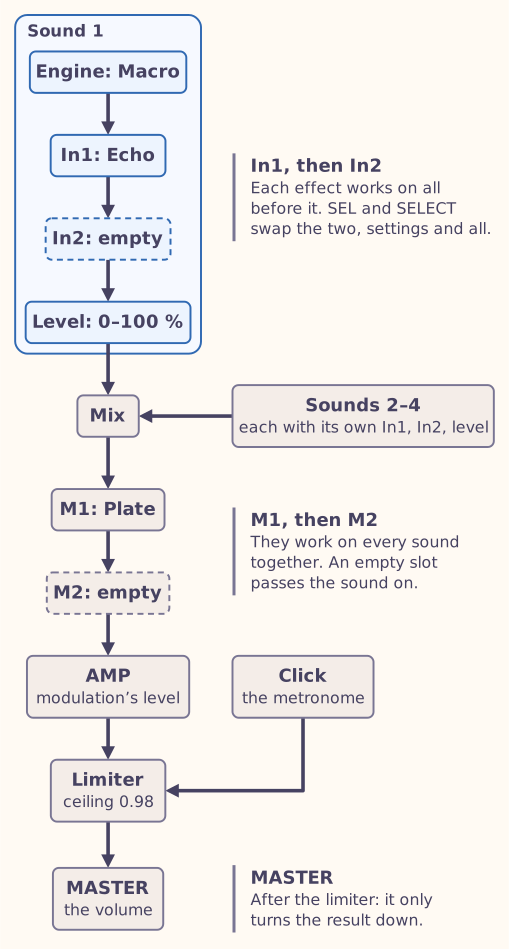
The simulator starts with Plate in M1, the first master slot, and every other slot empty. An effect processes everything before it: a sound’s inserts work on that sound alone, the master effects on everything. A reverb after a chorus sounds different from a chorus after a reverb.
To see the chain: press FX. The first line of the screen lists the current sound (such as S1), its two inserts In1 and In2, the Mix page and the master slots M1 and M2, with the chosen one highlighted; the line under it names the chosen slot’s effect and says whether the slot is an insert or a master slot. The chosen effect’s parameters are on KNOB1 to KNOB4. FX mode first opens on M1. Press FX again, or HOME, to return to the sound.
To choose a slot: turn SELECT. It moves through In1’s pages, then In2’s, the Mix page, M1’s and M2’s. The bottom bar shows where you are, such as 1/2 M2: page 1 of 2, the second master slot, or 1/1 S1 In1. The inserts are the current sound’s: to reach another sound’s inserts, choose that sound first (chapter 5).
To put an effect in the chosen slot: turn ALGORITHM. It steps through Empty slot, Plate, Ensemble, Diffuse, PSX Verb, Crush, Fold, Drive, Echo, Filter, Comb, Comp, Limiter, DJ Filter, Tilt, Master Sat, Isolator, EQ, Room, Hall, Gate, Squash, Transient, Test Gain and Test Ext, and round again, stepping over an effect that would not fit the memory (below). The list on the screen spells the short names out: Compressor, Master Saturation, Equaliser, Transient Shaper. In the simulator you can also use the Effect 1 and Effect 2 lists under the panel for the two master slots.
To empty a slot: turn ALGORITHM to Empty slot, one step before Plate, or choose (none) in the list.
To swap two effects: press SEL to pick up the chosen effect (its arrow turns into an asterisk and SEL lights), turn SELECT to move it, and press SEL again to put it down. The two inserts swap with each other, and the two master effects with each other. The effects move with their settings.
- An effect you put in a slot starts with its default settings, and the old effect’s tail stops at once.
- Knobs for frequencies and times turn in ratios. A cutoff, a crossover, a delay time or a release moves by the same musical step wherever it is: each click of the knob multiplies it, so 20 to 40 Hz takes as many clicks as 5 to 10 kHz, and a hundred clicks go from one end to the other. The screen still shows hertz and milliseconds, with more decimals at the low end, and the bar shows where the knob is. The sequencer’s locks will store them the same way once they reach the effects (chapter 7), and modulation moves them in octaves: a source that follows the note you play, at full amount, makes a cutoff follow the keyboard exactly.
- The same effect can sit in several slots, each with its own settings.
- Modulation reaches the effects’ parameters, in the inserts and the master slots (chapter 8). The sequencer’s parameter locks reach only the sounds’ parameters so far; locks on the effects are planned (chapter 7).
- Changing a sound’s engine keeps its inserts and the master effects, and their settings.
In the desktop tools, --fx adds effects in the order you give them, and
each --fx-param sets a parameter of the effect before it
(chapter 2). There you can chain
more than two. With the multi-sound options, --insert K:ID adds an insert
to sound K and the first two --fx are the master effects.
6.1.1 The Mix page
Between the inserts and the master slots, the Mix page shows the four sounds, each with its engine (or Empty) and its level into the mix, from 0 to 100 %. KNOB1 to KNOB4 set the levels of Sounds 1 to 4, 1 % a click. Every sound starts at 100 %.
6.1.2 Memory
Every sound, effect and module, the sequencer and modulation have to fit in the FM-1’s memory. The simulator measures them against the room M-VAVE’s firmware leaves free on the FM-1, as an estimate of what Lunar Modulator will have there (chapter 13), and shows memory only as a share of that room: 100 % is all of it. The meter in the screen’s bottom bar shows how much the whole chain takes, as a bar and a percentage, and the global page the same percentage.
Whatever would take the chain past 100 % is refused, whether you choose it with PRESETS, ALGORITHM or a list under the panel: the screen names it, says does not fit and what the chain would need with it, such as needs 112% of RAM, and the slot keeps what it had. PRESETS and ALGORITHM step on to the next choice that fits. Most chains fit; Shapes twice, or Shapes with PSX Verb and Plate, do not. So whatever plays in the simulator would fit the FM-1.
Rates
The effects run at the output’s rate. They were written for rates of about 48,000 samples a second, so at the FM-1’s 44,118 their delays come out about 9 % longer, a slightly larger room, and their slow modulation about 8 % slower. Their decay times are corrected, and stay within a few per cent of the originals’. Room, from Clouds, was written for 32,000, so its room comes out about a quarter smaller and its slow modulation faster; its decay is corrected the same way, though its shortest settings ring a little shorter than on Clouds. Crush, Fold, Drive, Echo, Filter, Comb, Comp, Limiter, DJ Filter, Tilt, Master Sat, Isolator, EQ, Hall, Gate, Squash and Transient, written or rewritten for Lunar Modulator, work out their frequencies and times from the output’s rate, so they need no correction.
6.2 Plate
Status:In the simulatorOn the desktopPlanned for the device
A plate reverb, from Mutable Instruments Rings: a dense, smooth tail that sits behind the sound. It takes the sum of both channels in and returns a stereo tail.
- Mix fades from the dry sound at the left to the reverb alone at the right.
- Decay sets how long the tail lasts.
- Damping darkens the tail as it decays: the higher, the darker.
- Diffusion smears the echoes into a smooth wash; lower values leave more distinct reflections. The default, 0.5, is the setting Rings itself uses.
- Freeze, on page 2, holds the tail at the level it has and lets nothing new in, as Mutable Instruments Elements does with this reverb: play over a frozen chord, and Mix still blends in what you play. Decay and Damping wait until you turn it off. It switches over 5 milliseconds, so it does not click, and modulation can turn it on and off in time. The hold is long but not endless: the highs fade over seconds and the body over minutes, and a quiet tail runs out sooner (about 25 seconds at −39 dBFS, nearly 3 minutes at −19 dBFS).
Starting points
- A small room: Decay low, Mix about 0.2.
- A long plate for pads: Decay high, Damping low, Mix about 0.4.
- A dark wash: Decay high, Damping high, Mix towards the right.
- A held chord: play a chord, turn Freeze on, then play over it.
| Page | KNOB1 | KNOB2 | KNOB3 | KNOB4 |
|---|---|---|---|---|
| Page 1 | Mix | Decay | Damping | Diffusion |
| Page 2 | Freeze | – | – | – |
| Parameter | Where | Type | Range | Default |
|---|---|---|---|---|
| Mix | Page 1 · KNOB1 | Continuous | 0 – 1 | 0.3 |
| Decay | Page 1 · KNOB2 | Continuous | 0 – 1 | 0.5 |
| Damping | Page 1 · KNOB3 | Continuous | 0 – 1 | 0.3 |
| Diffusion | Page 1 · KNOB4 | Continuous | 0 – 1 | 0.5 |
| Freeze | Page 2 · KNOB1 | List, 2 values | 0 – 1 | 0 Off |
Freeze values
- 0 Off
- 1 On
6.3 Ensemble
Status:In the simulatorOn the desktopPlanned for the device
The ensemble from Plaits’ string machine: a rich, swirling chorus that turns one voice into many. It mixes three moving copies of the sound, swept by a slow and a fast modulation.
- Mix blends in the effect. The dry sound never drops below half, so even at the right the original is still there.
- Depth sets how far the copies drift.
- Width spreads the effect across the stereo field. At the left both sides are the same, as in the original module; turn it up to widen a mono engine.
Ensemble has no tail: when the sound stops, so does the effect.
Strings and pads
Put Ensemble before Plate for string-machine pads, and keep Depth low for a subtle thickening of single notes.
| Page | KNOB1 | KNOB2 | KNOB3 | KNOB4 |
|---|---|---|---|---|
| Page 1 | Mix | Depth | Width | – |
| Parameter | Where | Type | Range | Default |
|---|---|---|---|---|
| Mix | Page 1 · KNOB1 | Continuous | 0 – 1 | 0.5 |
| Depth | Page 1 · KNOB2 | Continuous | 0 – 1 | 0.5 |
| Width | Page 1 · KNOB3 | Continuous | 0 – 1 | 1 |
6.4 Diffuse
Status:In the simulatorOn the desktopPlanned for the device
The diffuser from Plaits’ particle model: a short, grainy reverb that blurs attacks. It takes the sum of both channels in and returns a stereo result.
- Mix fades from the dry sound at the left to the effect alone at the right.
- Time sets how long the blur lasts.
- Tone darkens the effect: at the left only the lows remain, and at the right almost nothing is filtered. The default lets through everything up to about 9.5 kHz.
- Width spreads the effect across the stereo field. At the left both sides are the same.
Softening attacks
Use Diffuse on percussion such as Sophie or Macro Heavy’s drums, and in front of Plate to soften the start of each note before the long tail.
| Page | KNOB1 | KNOB2 | KNOB3 | KNOB4 |
|---|---|---|---|---|
| Page 1 | Mix | Time | Tone | Width |
| Parameter | Where | Type | Range | Default |
|---|---|---|---|---|
| Mix | Page 1 · KNOB1 | Continuous | 0 – 1 | 0.5 |
| Time | Page 1 · KNOB2 | Continuous | 0 – 1 | 0.5 |
| Tone | Page 1 · KNOB3 | Continuous | 0 – 1 | 0.75 |
| Width | Page 1 · KNOB4 | Continuous | 0 – 1 | 1 |
6.5 PSX Verb
Status:In the simulatorOn the desktopPlanned for the device
A reverb modelled on the sound chip of a well-known 1990s games console, by Charles Vestal, from the Schwung community. Its six models range from a small room to a hall and Space Echo.
- Model chooses the room: Room, Studio S, Studio M, Studio L, Hall or Space Echo. The default is Hall.
- Decay sets the length of the tail. In the middle it matches the original chip; to the left it is shorter, to the right longer.
- Mix fades from the dry sound at the left to the reverb alone at the right.
- Level sets how loud the reverb itself is.
- Input, on page 2, sets how hard the reverb is driven.
Choosing the model
In FX mode, ALGORITHM changes the effect in the slot, not PSX Verb’s model. To change the model, turn KNOB1 on page 1.
PSX Verb takes 35 % of the memory, the most of any effect.
| Page | KNOB1 | KNOB2 | KNOB3 | KNOB4 |
|---|---|---|---|---|
| Page 1 | Model | Decay | Mix | Level |
| Page 2 | Input | – | – | – |
| Parameter | Where | Type | Range | Default |
|---|---|---|---|---|
| Model | Page 1 · KNOB1 | List, 6 values | 0 – 5 | 4 Hall |
| Decay | Page 1 · KNOB2 | Continuous | 0 – 1 | 0.7 |
| Mix | Page 1 · KNOB3 | Continuous | 0 – 1 | 0.35 |
| Level | Page 1 · KNOB4 | Continuous | 0 – 1 | 0.5 |
| Input | Page 2 · KNOB1 | Continuous | 0 – 1 | 0.5 |
Model values
- 0 Room
- 1 Studio S
- 2 Studio M
- 3 Studio L
- 4 Hall
- 5 Space Echo
6.6 Crush
Status:In the simulatorOn the desktopPlanned for the device
A bitcrusher and sample-rate reducer, for the grit of early samplers and game consoles. It holds each sample for a while and rounds it to a coarse step, so the sound loses its top end in a shower of aliasing and its quiet detail in buzz. Both channels are held at the same moments.
- Bits sets how fine the steps are, from 16, all but untouched, down to 1. It turns smoothly between whole numbers, so it can sweep. Silence stays silent at any setting, but at very low Bits quiet sounds fall under the first step and drop out: at 1 bit only full-scale sound comes through.
- Rate sets how often a new sample is taken, from 100 times a second at the left to every sample at the right; the default is about 9,600. The scale is even in pitch, so each step of the knob sounds alike.
- Jitter makes each hold a little longer or shorter at random, which roughens the tone and smears the aliasing into noise. At the left every hold is the same length. The randomness repeats exactly each time the effect starts.
- Mix fades from the dry sound at the left to the crushed sound alone at the right, the default.
- Tone, on page 2, darkens the crushed sound: at the right nothing is filtered, at the left only the lows below about 150 Hz remain.
- Level, on page 2, sets how loud the crushed sound is, up to twice its level.
Starting points
- Old sampler: Bits 12, Rate about 0.8, Tone about 0.8.
- Broken game console: Bits 4, Rate about 0.5, Jitter a little.
- Radio static: Bits 2 to 3, Rate low, Jitter high, Mix about 0.5.
- Turn the engine up rather than Level when low Bits makes a quiet sound vanish: the steps are fixed against full scale.
| Page | KNOB1 | KNOB2 | KNOB3 | KNOB4 |
|---|---|---|---|---|
| Page 1 | Bits | Rate | Jitter | Mix |
| Page 2 | Tone | Level | – | – |
| Parameter | Where | Type | Range | Default |
|---|---|---|---|---|
| Bits | Page 1 · KNOB1 | Continuous | 1 – 16 | 8 |
| Rate | Page 1 · KNOB2 | Continuous | 0 – 1 | 0.75 |
| Jitter | Page 1 · KNOB3 | Continuous | 0 – 1 | 0 |
| Mix | Page 1 · KNOB4 | Continuous | 0 – 1 | 1 |
| Tone | Page 2 · KNOB1 | Continuous | 0 – 1 | 1 |
| Level | Page 2 · KNOB2 | Continuous | 0 – 2 | 1 |
6.7 Fold
Status:In the simulatorOn the desktopPlanned for the device
A wavefolder, written for Lunar Modulator, after the folders of Serge and Buchla synthesizers. It turns the sound up into a fold point and folds whatever passes it back on itself, again and again, so a plain wave grows bright, hollow, ringing overtones that move as the level changes. Each channel is folded on its own.
- Fold sets how hard the sound is driven into the folds, from not at all at the left (a sound within full scale passes unfolded) to sixteen times at the right. The louder the note, the more it folds, so velocity and the engine’s envelope shape the tone.
- Symmetry shifts the sound before it is folded. In the middle the folds are even; away from it they are lopsided and add a hollow, reedy colour, and at either end a quiet sound is folded on one side only.
- Shape chooses the fold: at the left sharp corners, bright and buzzy; at the right rounded ones, softer; in between a blend.
- Mix fades from the dry sound at the left to the folded sound alone at the right, the default.
- Tone, on page 2, darkens the folded sound, from about 200 Hz at the left to almost nothing filtered at the right.
- Level, on page 2, sets how loud the folded sound is.
Silence stays silent at any setting, and the knobs glide over a few milliseconds, so turning them does not click. Fold is built to keep the harsh, unrelated tones of a digital folder low, and it has no tail: when the sound stops, so does the effect.
Starting points
- West-coast lead: a sine from Shapes or Macro, Fold about 0.6, Shape about 0.5, and play with velocity.
- Reedy bass: Fold about 0.4, Symmetry about 0.4, Tone about 0.6.
- Movement: put Ensemble or Echo after Fold, and sweep Fold slowly by hand while a note holds.
| Page | KNOB1 | KNOB2 | KNOB3 | KNOB4 |
|---|---|---|---|---|
| Page 1 | Fold | Symmetry | Shape | Mix |
| Page 2 | Tone | Level | – | – |
| Parameter | Where | Type | Range | Default |
|---|---|---|---|---|
| Fold | Page 1 · KNOB1 | Continuous | 0 – 1 | 0.4 |
| Symmetry | Page 1 · KNOB2 | Continuous | −1 – 1 | 0 |
| Shape | Page 1 · KNOB3 | Continuous | 0 – 1 | 0 |
| Mix | Page 1 · KNOB4 | Continuous | 0 – 1 | 1 |
| Tone | Page 2 · KNOB1 | Continuous | 0 – 1 | 0.8 |
| Level | Page 2 · KNOB2 | Continuous | 0 – 1 | 0.7 |
6.8 Drive
Status:In the simulatorOn the desktopPlanned for the device
Overdrive and saturation, written for Lunar Modulator: the sound is turned up into a curve that flattens its peaks, from a gentle warmth to a buzzing fuzz. Each channel is shaped on its own.
- Type chooses the curve. Changing it fades from one to the next in a
few milliseconds, so it does not click, even when modulation changes it
on every step.
- Soft: smooth, rounded saturation, the most even-tempered.
- Tube: lopsided, so it adds a warm second harmonic even when barely driven, and squashes one side of the wave before the other.
- Diode: clean up to a point, then a firmer knee, like the clipping diodes in an overdrive pedal.
- Fuzz: a hard clip with corners, lopsided and with a little gate of its own, so decaying notes break up and sputter.
- Tape: gentle, with more headroom; loud high notes and bright sounds saturate first and come out softened.
- Drive sets how hard the sound is driven, from −12 dB at the left (nearly clean) to +36 dB at the right. Louder notes are driven harder, so velocity and the engine’s envelope change the tone.
- Tone tilts the driven sound: in the middle it is left alone, to the left the highs are cut (darker, less fizz), to the right the lows (thinner, brighter).
- Mix fades from the dry sound at the left to the driven sound alone at the right, the default. In between, the dry sound keeps its punch under the drive.
- Bias, on page 2, makes the clipping uneven, which adds a hollow, reedy colour; in the middle the curve is used as it is.
- Gate, on page 2, makes the quietest part of each wave drop out, from nothing at the left to a lot at the right: a crackle on every Type, and on Fuzz the starved, sputtering sound of a fuzz with a dying battery. More Drive lets more of the sound through.
- Level, on page 2, sets how loud the driven sound is, from −24 to +12 dB.
- Auto, on page 2, is on by default: it keeps the driven sound about as loud as the dry sound whatever Drive and Type are, so turning Drive changes the character and not the volume. Turn it off to let Drive make the sound louder too, as on a pedal.
Silence stays silent at any setting, and the knobs glide over a few milliseconds, so turning them does not click. Drive is built to keep the harsh, unrelated tones of a digital clipper low, and it has no tail: when the sound stops, so does the effect.
Starting points
- Warm bass: Tube, Drive about +12 dB, Tone a little left of the middle.
- Lead: Diode, Drive +24 dB, Tone about 0.4, then a little Echo.
- Broken fuzz: Fuzz, Drive +24 dB, Gate about 0.4, Bias a little off the middle, and play notes that decay.
- Tape glue: Tape, Drive about +18 dB, Mix about 0.6, on chords.
| Page | KNOB1 | KNOB2 | KNOB3 | KNOB4 |
|---|---|---|---|---|
| Page 1 | Type | Drive | Tone | Mix |
| Page 2 | Bias | Gate | Level | Auto |
| Parameter | Where | Type | Range | Default |
|---|---|---|---|---|
| Type | Page 1 · KNOB1 | List, 5 values | 0 – 4 | 0 Soft |
| Drive | Page 1 · KNOB2 | Continuous | −12 – 36 dB | 12 dB |
| Tone | Page 1 · KNOB3 | Continuous | 0 – 1 | 0.5 |
| Mix | Page 1 · KNOB4 | Continuous | 0 – 1 | 1 |
| Bias | Page 2 · KNOB1 | Continuous | −1 – 1 | 0 |
| Gate | Page 2 · KNOB2 | Continuous | 0 – 1 | 0 |
| Level | Page 2 · KNOB3 | Continuous | −24 – 12 dB | 0 dB |
| Auto | Page 2 · KNOB4 | List, 2 values | 0 – 1 | 1 On |
Type values
- 0 Soft
- 1 Tube
- 2 Diode
- 3 Fuzz
- 4 Tape
Auto values
- 0 Off
- 1 On
6.9 Echo
Status:In the simulatorOn the desktopPlanned for the device
A stereo echo, written for Lunar Modulator, whose repeats can bounce from one side to the other. Up to about a third of a second the echoes are clean copies; longer ones grow darker with each repeat, like those of an old analogue echo pedal, so that the effect keeps to 17 % of the memory however long the time.
- Time sets the delay, from 10 milliseconds at the left to one second at the right; the default is 300. Turning it while echoes sound bends their pitch, like changing a tape echo’s speed.
- Feedback sets how many times the sound repeats, from a single echo at the left to a long, slowly fading trail at the right. It never runs away.
- Ping-pong at the right, the default, sends the repeats left, right, left; at the left each side echoes on its own side.
- Mix fades from the dry sound to the echoes. The dry sound stays at full level up to the middle and the echoes are at full level from the middle on, so the middle has both at full level.
- Tone, on page 2, darkens each repeat a little more than the one before: at the left the trail turns dull quickly, at the right it stays bright.
- Wow, on page 2, adds a slow wobble to the delay, like a worn tape; it sounds the same every time you play.
- Level, on page 2, sets how much of the sound goes into the echo. Turn it down to let the echoes ring on while what you play next stays dry.
Starting points
- Slapback: Time about 100, Feedback low, Ping-pong at the left, Mix about 0.3.
- Wide bounce: Time about 300, Feedback about 0.5, Ping-pong at the right.
- Dub trail: Time about 600, Feedback high, Tone about 0.3, Wow about 0.3.
Echo does not yet follow the sequencer’s tempo; set Time by ear.
| Page | KNOB1 | KNOB2 | KNOB3 | KNOB4 |
|---|---|---|---|---|
| Page 1 | Time | Feedback | Ping-pong | Mix |
| Page 2 | Tone | Wow | Level | – |
| Parameter | Where | Type | Range | Default |
|---|---|---|---|---|
| Time | Page 1 · KNOB1 | Continuous, logarithmic | 10 – 1000 ms | 300 ms |
| Feedback | Page 1 · KNOB2 | Continuous | 0 – 1 | 0.4 |
| Ping-pong | Page 1 · KNOB3 | Continuous | 0 – 1 | 1 |
| Mix | Page 1 · KNOB4 | Continuous | 0 – 1 | 0.35 |
| Tone | Page 2 · KNOB1 | Continuous | 0 – 1 | 0.6 |
| Wow | Page 2 · KNOB2 | Continuous | 0 – 1 | 0.1 |
| Level | Page 2 · KNOB3 | Continuous | 0 – 1 | 1 |
6.10 Filter
Status:In the simulatorOn the desktopPlanned for the device
A filter with six characters in one, written for Lunar Modulator. It takes away part of the sound’s spectrum, the highs, the lows or a band, and as Resonance rises it rings at the cutoff, up to a whistle of its own. Each channel is filtered on its own, so Morph can pull them apart.
- Type chooses the filter. Changing it starts the new one quietly in
the background, then fades over to it, all within about 10 milliseconds,
so it does not click, even when modulation changes it on every step.
- SVF: a clean state-variable filter. Mode picks low-pass, band-pass, high-pass or notch.
- Ladder: the classic four-stage ladder, the default: round and thick, and its bass holds as Resonance rises. Mode picks how steep it is, from 24 dB per octave down to 6.
- Diode: a diode ladder in the style of the TB-303: rubbery and squelchy at high Resonance. Mode as for Ladder.
- Sallen-Key: a Sallen-Key filter, after the Korg-35 filter of the later MS-20: bright and aggressive, it screams as Resonance rises. Mode picks low-pass, band-pass, high-pass or notch.
- SK Mixed: a mixed-input Sallen-Key, after the Steiner-Parker Synthacon’s filter: gritty and uneven. Mode picks which input the sound goes into: low-pass, band-pass, high-pass, or a notch.
- Formant: the vowels A, E, I, O and U, as a voice shapes them. Morph sweeps through the vowels; Mode picks the voice, a man’s at the left, a woman’s in the middle, a child’s at the right; Cutoff shifts the vowels up or down; Resonance makes them narrower and more vocal.
- Cutoff sets where the filter works, from 20 Hz to 18 kHz; the default is 2 kHz. When a filter rings on its own, it rings at this pitch. Each click moves it about a semitone, the same at any height.
- Resonance emphasises the sound around Cutoff. Near the right, from about 0.93, SVF, Ladder, Diode, Sallen-Key and SK Mixed whistle on their own, in tune with Cutoff (SK Mixed a little flat). On Formant it sets how narrow the vowels are.
- Drive pushes the sound into the filter’s saturation: quiet sounds come up to 12 dB louder, loud ones thicken and grit.
- Mode, on page 2, changes the response as each Type above describes. It turns smoothly: between two positions you hear a blend of both.
- Morph, on page 2, spreads the two channels for SVF, Ladder, Diode, Sallen-Key and SK Mixed: at the right, the left channel’s cutoff is up to an octave lower and the right’s an octave higher. On Formant it sweeps the vowels.
- Mix, on page 2, fades from the dry sound at the left to the filtered sound alone at the right, the default.
- Level, on page 2, sets the filtered sound’s level, up to twice (6 dB) at the right.
Silence stays silent at any setting, even with a filter ringing, and the knobs glide over a few milliseconds, so turning them does not click.
Starting points
- Acid bass: Diode, Cutoff about 400 Hz, Resonance about 0.8, Drive about 0.5, low notes, and turn Cutoff while they play.
- Talking pad: Formant, Resonance about 0.6, and sweep Morph slowly.
- Screaming lead: Sallen-Key, Resonance about 0.9, Drive about 0.3.
- Wide sweep: Ladder, Morph about 0.3, and sweep Cutoff.
The comb filter that was the seventh Type until October 2026 is an effect of its own now: Comb.
| Page | KNOB1 | KNOB2 | KNOB3 | KNOB4 |
|---|---|---|---|---|
| Page 1 | Type | Cutoff | Resonance | Drive |
| Page 2 | Mode | Morph | Mix | Level |
| Parameter | Where | Type | Range | Default |
|---|---|---|---|---|
| Type | Page 1 · KNOB1 | List, 6 values | 0 – 5 | 1 Ladder |
| Cutoff | Page 1 · KNOB2 | Continuous, logarithmic | 20 – 18000 Hz | 2000 Hz |
| Resonance | Page 1 · KNOB3 | Continuous | 0 – 1 | 0.25 |
| Drive | Page 1 · KNOB4 | Continuous | 0 – 1 | 0 |
| Mode | Page 2 · KNOB1 | Continuous | 0 – 3 | 0 |
| Morph | Page 2 · KNOB2 | Continuous | 0 – 1 | 0 |
| Mix | Page 2 · KNOB3 | Continuous | 0 – 1 | 1 |
| Level | Page 2 · KNOB4 | Continuous | 0 – 2 | 1 |
Type values
- 0 SVF
- 1 Ladder
- 2 Diode
- 3 Sallen-Key
- 4 SK Mixed
- 5 Formant
6.11 Comb
Status:In the simulatorOn the desktopPlanned for the device
A comb filter, written for Lunar Modulator: a very short echo tuned by Cutoff, which makes metallic, flanger-like peaks or notches at the multiples of that pitch. It was one of Filter’s types until October 2026; on its own, Filter no longer carries its memory.
- Cutoff tunes the comb, from 20 Hz to 18 kHz; the default is 2 kHz. Set it on the note you play and the sound rings at that pitch. Like Filter’s, each click moves it about a semitone.
- Resonance sets how long the echo rings, from a short colour at the left to a long, singing ring at the right.
- Drive pushes the sound into the comb’s saturation: quiet sounds come up louder, loud ones thicken.
- Mode, on page 2, goes from peaks at the left (the echo fed back) to notches at the right (the echo added once), blending between.
- Morph, on page 2, sets the polarity: at the left the peaks sit on Cutoff’s harmonics; in the middle the comb does nothing; at the right the sound turns hollow and an octave lower.
- Mix, on page 2, fades from the dry sound at the left to the comb alone at the right, the default.
- Level, on page 2, sets the comb’s level, up to twice (6 dB).
Silence stays silent at any setting, and the knobs glide, so turning them does not click.
Starting points
- Metallic ring: Cutoff on the note you play, Resonance about 0.8.
- Hollow tube: Morph at the right, Resonance about 0.6, Cutoff an octave above the note.
- Flanger: Mode about 2, Mix about 0.5, and modulate Cutoff with a slow LFO.
| Page | KNOB1 | KNOB2 | KNOB3 | KNOB4 |
|---|---|---|---|---|
| Page 1 | Cutoff | Resonance | Drive | – |
| Page 2 | Mode | Morph | Mix | Level |
| Parameter | Where | Type | Range | Default |
|---|---|---|---|---|
| Cutoff | Page 1 · KNOB1 | Continuous, logarithmic | 20 – 18000 Hz | 2000 Hz |
| Resonance | Page 1 · KNOB2 | Continuous | 0 – 1 | 0.25 |
| Drive | Page 1 · KNOB3 | Continuous | 0 – 1 | 0 |
| Mode | Page 2 · KNOB1 | Continuous | 0 – 3 | 0 |
| Morph | Page 2 · KNOB2 | Continuous | 0 – 1 | 0 |
| Mix | Page 2 · KNOB3 | Continuous | 0 – 1 | 1 |
| Level | Page 2 · KNOB4 | Continuous | 0 – 2 | 1 |
6.12 Comp
Status:In the simulatorOn the desktopPlanned for the device
A compressor, written for Lunar Modulator. When the sound gets louder than a threshold, Comp turns it down, so loud and quiet notes sit closer together: drums hit harder and hang together, chords sustain evenly, a bass line stays steady. Both channels are turned down together, so the stereo picture does not move.
- Threshold sets the level above which Comp starts to work, from −60 dB at the left to 0 dB, full scale, at the right. The lower it is, the more of the sound is compressed.
- Ratio sets how hard. At 4, the default, every 4 dB that the sound rises past the threshold comes out as 1 dB. It goes from 1 (no compression) to 20, and at 21, the far right, nothing gets past the threshold at all: Comp becomes a limiter.
- Attack sets how quickly Comp reacts, from at once at 0 to 100 milliseconds. A slower attack lets the start of each note or hit through before the sound is turned down, which keeps it punchy.
- Release sets how quickly the sound comes back up once it gets quieter, from 10 milliseconds to 2 seconds. Short releases pump with the rhythm; long ones hold the level steady.
- Knee, on page 2, softens the threshold. At 0 the compression starts all at once; the higher the knee, the more gently it eases in, over that many dB around the threshold.
- Makeup, on page 2, turns the result up, or down, by up to 24 dB, to win back the level the compression took.
- Mix, on page 2, blends the untouched sound back in. At the right, the default, you hear only the compressed sound; in between is parallel compression, where the dry sound’s hits ride on the compressed sound’s body.
- Character, on page 2, chooses how Comp listens and reacts:
- Peak reacts to every peak: precise, for taming hits and for limiting.
- RMS reacts to the average loudness, which is gentler and closer to how loud the sound seems.
- Glue listens like RMS, but more slowly, lets go more smoothly and has a softer knee: for holding chords or a whole part together.
- Punch reacts to peaks but eases into each one, so the front of every hit gets through before Comp clamps down.
- Auto Rel, on page 3, makes the release follow the music. After a short peak the sound comes back quickly; after a long loud passage, slowly. Short hits leave no holes and long notes do not pump.
- Auto Gain, on page 3, sets the makeup for you, so that a sound at full scale stays at full scale however Threshold, Ratio and Knee are set, up to 24 dB of it: past that, at very low thresholds and high ratios, the sound comes out quieter. It never pushes a sound past full scale, and it touches nothing else: only a moment that its makeup would push past full scale, such as the start of a hit before Attack has caught up, is held at full scale, so a sound that does not pass full scale on the way in does not pass it on the way out, and everything under full scale, steady notes included, sounds exactly as with the same makeup set by hand. Where it holds a peak it clips it, so with a slow Attack the starts of loud notes can sound slightly gritty; a shorter Attack, or the Limiter for a clean ceiling, avoids it. Makeup then adds to it or takes from it; with Makeup above 0 the output can pass full scale by that much.
Silence stays silent at any setting, and the knobs glide over a few milliseconds, so turning them does not click; changing Character, Auto Rel or Auto Gain while Comp is working does not jump either, so modulation can change them on every step.
Starting points
- Tighter drums: Peak, Threshold about −20, Ratio 4, Attack about 10, Release about 100, Auto Gain on.
- Smooth pad: Glue, Threshold about −24, Ratio 2 to 3, Attack about 30, Release about 400, Auto Rel on.
- Parallel punch: Punch, Threshold about −35, Ratio 8, Mix about 0.5, then Makeup to taste.
- Brick wall: Peak, Ratio 21, Attack 0, Release about 50, the threshold just under the loudest peaks.
Comp listens only to the sound passing through it. Making one sound duck under another (a sidechain) may come later.
| Page | KNOB1 | KNOB2 | KNOB3 | KNOB4 |
|---|---|---|---|---|
| Page 1 | Threshold | Ratio | Attack | Release |
| Page 2 | Knee | Makeup | Mix | Character |
| Page 3 | Auto Rel | Auto Gain | – | – |
| Parameter | Where | Type | Range | Default |
|---|---|---|---|---|
| Threshold | Page 1 · KNOB1 | Continuous | −60 – 0 dB | −18 dB |
| Ratio | Page 1 · KNOB2 | Continuous | 1 – 21 | 4 |
| Attack | Page 1 · KNOB3 | Continuous | 0 – 100 ms | 10 ms |
| Release | Page 1 · KNOB4 | Continuous, logarithmic | 10 – 2000 ms | 150 ms |
| Knee | Page 2 · KNOB1 | Continuous | 0 – 24 dB | 6 dB |
| Makeup | Page 2 · KNOB2 | Continuous | −12 – 24 dB | 0 dB |
| Mix | Page 2 · KNOB3 | Continuous | 0 – 1 | 1 |
| Character | Page 2 · KNOB4 | List, 4 values | 0 – 3 | 0 Peak |
| Auto Rel | Page 3 · KNOB1 | List, 2 values | 0 – 1 | 0 Off |
| Auto Gain | Page 3 · KNOB2 | List, 2 values | 0 – 1 | 0 Off |
Character values
- 0 Peak
- 1 RMS
- 2 Glue
- 3 Punch
Auto Rel values
- 0 Off
- 1 On
Auto Gain values
- 0 Off
- 1 On
6.13 Limiter
Status:In the simulatorOn the desktopPlanned for the device
A look-ahead brickwall limiter, written for Lunar Modulator, for the whole sound (in M2, the second master slot) or to tame one effect’s peaks. It sees peaks a few milliseconds before they arrive and turns the sound down just in time, so nothing passes its ceiling, and it leaves anything quieter untouched.
- Ceiling is the most the output reaches, from −24 dB at the left to 0 dB, full scale, at the right; the default is −1 dB.
- Drive turns the sound up into the limiter, by up to 24 dB, for a louder, denser sound; to the left of 0 it turns the sound down.
- Release sets how quickly the sound comes back up after a peak, from 1 millisecond to 1 second; the default is 100 milliseconds. Short releases are louder but can pump or distort low notes; long ones are smoother.
- Lookahead sets how far ahead the limiter looks, from 0 to 5 milliseconds; the default is 2. The sound is delayed by as much. At 0 there is no delay, and the limiter catches the front of each peak with a gentle soft clip instead.
- Mode, on page 2, chooses how peaks are handled:
- Brickwall turns them down, so nothing passes the ceiling and nothing below it is changed.
- Soft Clip lets them run into a curve that rounds them off just under the ceiling: louder and warmer, with some added harmonics.
- Round lets peaks up to 3 dB over the ceiling through to a gentle final clip that rounds each one off between its neighbours and the ceiling, and turns down only what goes further. Everything under the ceiling passes untouched. Louder than Brickwall, with a little edge on the loudest peaks; after the Airwindows ClipOnly2 clipper (chapter 14). The 3 dB is meant: the limiter leaves the top 3 dB of each peak to the clip, which is where Round’s loudness and edge come from, and the output still never goes past the ceiling.
- Link, on page 2, at the right, the default, turns both channels down together, so the stereo picture holds. At the left each channel is limited on its own: louder, but a peak on one side can shift the picture.
- Mix, on page 2, blends the untouched sound back in (parallel limiting). Below the right end, the output can pass the ceiling.
Turning Lookahead fades from the old delay to the new, and switching Mode fades too, so neither clicks, even when modulation changes them on every step; the ceiling holds throughout. The other knobs glide over a few milliseconds.
Starting points
- Safety on the whole sound: in M2, Ceiling −1 dB, the rest at their defaults.
- Louder: Drive +6 to +9 dB, Release about 60 milliseconds.
- Warm and loud: Soft Clip, Drive about +6 dB, Lookahead 0.
- Loud, only the tips touched: Round, Drive about +3 dB, Ceiling −1 dB.
The limiter at the very end of the chain (below) stays in place. With Ceiling at −0.2 dB or lower and nothing louder after it, it has nothing left to do.
| Page | KNOB1 | KNOB2 | KNOB3 | KNOB4 |
|---|---|---|---|---|
| Page 1 | Ceiling | Drive | Release | Lookahead |
| Page 2 | Mode | Link | Mix | – |
| Parameter | Where | Type | Range | Default |
|---|---|---|---|---|
| Ceiling | Page 1 · KNOB1 | Continuous | −24 – 0 dB | −1 dB |
| Drive | Page 1 · KNOB2 | Continuous | −12 – 24 dB | 0 dB |
| Release | Page 1 · KNOB3 | Continuous, logarithmic | 1 – 1000 ms | 100 ms |
| Lookahead | Page 1 · KNOB4 | Continuous | 0 – 5 ms | 2 ms |
| Mode | Page 2 · KNOB1 | List, 3 values | 0 – 2 | 0 Brickwall |
| Link | Page 2 · KNOB2 | Continuous | 0 – 1 | 1 |
| Mix | Page 2 · KNOB3 | Continuous | 0 – 1 | 1 |
Mode values
- 0 Brickwall
- 1 Soft Clip
- 2 Round
6.14 DJ Filter
Status:In the simulatorOn the desktopPlanned for the device
A one-knob filter of the kind on a DJ mixer, written for Lunar Modulator. Turned left of the middle it takes away the highs, turned right it takes away the lows, and around the middle it leaves the sound alone. It suits a master slot, M2 at the end, where it works on everything before it, for build-ups and breakdowns.
- Sweep moves the filter. From the middle to the left, a low-pass closes from 20 kHz down to 60 Hz until only the bass is left; from the middle to the right, a high-pass opens from 20 Hz up to 8 kHz until only the top is left. Equal turns move it by equal musical steps. Around the middle the sound passes through untouched.
- Resonance adds a peak at the filter’s frequency. It is strongest halfway along each side and fades out towards both ends, so the open end never whistles and the far end never booms.
- Slope chooses how steeply the filter cuts: 12 dB per octave, the default, or 24 dB for a deeper cut. Changing it fades from one to the other in a few milliseconds, so it can be switched while playing.
- Mix fades from the dry sound at the left to the filtered sound alone at the right, the default.
- Dead Zone, on page 2, sets how wide the untouched middle is, from none to a fifth of the way to either end; the default is 0.05.
- Range, on page 2, shortens the sweep for gentler moves. At 1, the default, the knob reaches the whole sweep; at 0.5 the low-pass stops at about 1.1 kHz and the high-pass at about 400 Hz.
Sweeps are smooth whether you turn the knob or modulate it, and crossing from one side to the other neither clicks nor thumps.
Starting points
- Breakdown: turn Sweep slowly to about −0.7 with Resonance about 0.3, and back to the middle on the drop.
- Thin build-up: Slope 24 dB, Resonance about 0.5, and turn Sweep to the right over a few bars.
- Gentle moves: Range about 0.5, so the whole knob covers only the middle of the sweep.
| Page | KNOB1 | KNOB2 | KNOB3 | KNOB4 |
|---|---|---|---|---|
| Page 1 | Sweep | Resonance | Slope | Mix |
| Page 2 | Dead Zone | Range | – | – |
| Parameter | Where | Type | Range | Default |
|---|---|---|---|---|
| Sweep | Page 1 · KNOB1 | Continuous | −1 – 1 | 0 |
| Resonance | Page 1 · KNOB2 | Continuous | 0 – 1 | 0.2 |
| Slope | Page 1 · KNOB3 | List, 2 values | 0 – 1 | 0 12 dB |
| Mix | Page 1 · KNOB4 | Continuous | 0 – 1 | 1 |
| Dead Zone | Page 2 · KNOB1 | Continuous | 0 – 0.2 | 0.05 |
| Range | Page 2 · KNOB2 | Continuous | 0.1 – 1 | 1 |
Slope values
- 0 12 dB
- 1 24 dB
6.15 Tilt
Status:In the simulatorOn the desktopPlanned for the device
A tilt equaliser, written for Lunar Modulator: one knob turns the whole sound darker or brighter. Turned right, the highs rise and the lows fall by the same amount; turned left, the reverse. One frequency, the pivot, keeps its level, so the sound changes colour without getting much louder or quieter. It suits the end of the chain, M2, where it shapes everything before it.
- Tilt sets how far, up to 9 dB either way. In the middle, the default, the sound passes through untouched.
- Pivot sets the frequency that stays put, from 200 Hz to 5 kHz; the default is 1 kHz. Lower it to brighten or darken mostly the body of the sound, raise it to work mostly on the air at the top.
- Curve chooses the shape. Shelf, the default, turns quickly around the pivot and then levels off, like the treble and bass controls of an amplifier turned in opposite directions. Slope turns more gently and evenly across the whole range, for a subtler change of colour.
- Level sets the output level, from −24 dB to +12 dB, to make up for what a strong tilt adds or takes away.
Every control, Curve included, moves smoothly when you turn it, so Tilt can be swept or modulated without clicks.
Starting points
- Warm up a bright mix: Tilt about −3, Curve Slope.
- Lift a dull pad: Tilt about +4, Pivot about 2 kHz.
- Telephone-thin, for a break: Tilt at the right, Pivot about 3 kHz, Level down a few dB.
| Page | KNOB1 | KNOB2 | KNOB3 | KNOB4 |
|---|---|---|---|---|
| Page 1 | Tilt | Pivot | Curve | Level |
| Parameter | Where | Type | Range | Default |
|---|---|---|---|---|
| Tilt | Page 1 · KNOB1 | Continuous | −9 – 9 dB | 0 dB |
| Pivot | Page 1 · KNOB2 | Continuous, logarithmic | 200 – 5000 Hz | 1000 Hz |
| Curve | Page 1 · KNOB3 | List, 2 values | 0 – 1 | 0 Shelf |
| Level | Page 1 · KNOB4 | Continuous | −24 – 12 dB | 0 dB |
Curve values
- 0 Shelf
- 1 Slope
6.16 Master Sat
Status:In the simulatorOn the desktopPlanned for the device
Gentle saturation for the whole mix, written for Lunar Modulator: the warmth and density of a signal pushed a little too hard through analogue gear, meant to be left on. Quiet passages pass through unchanged and only the loud parts are rounded off. The bass and the top end can be kept out of it, so the low end stays tight and the highs stay clear. It starts with Mix at the left, where it changes nothing at all: turn Mix up to hear it.
- Drive sets how early the sound starts to bend, from barely, only the loudest peaks, at the left to well into it at the right. It does not make the sound louder: quiet notes keep their level.
- Clean Lo keeps the bass below it out of the saturation, from 20 Hz to 300 Hz. Higher settings keep the kick and the bass line clean and stop them from muddying everything else, and Glue does not react to them.
- Glue turns the whole sound down a little when the saturation works hard, up to about 6 dB, and lets it back up over a fraction of a second, like a bus compressor. It holds a mix together and keeps loud passages from turning harsh. At the left it does nothing.
- Mix fades from the dry sound at the left, the default, to the saturated sound alone at the right.
- Shape, on page 2, chooses the curve: Smooth, the default, bends gradually; Dense bends sooner and holds the peaks lower, for a thicker, more compressed sound. Changing it fades from one to the other in a few milliseconds, so it can be switched while playing.
- Asymmetry, on page 2, makes one side of the wave bend before the other, which adds a warmer, rounder colour of even harmonics. In the middle, the default, both sides bend alike.
- Clean Hi, on page 2, keeps the highs above it out of the saturation, from 1 kHz to 20 kHz; the default is 6 kHz. Lower settings keep cymbals and the top of the sound crisp; at the right almost everything is saturated.
- Level, on page 2, sets how loud the saturated sound is, from 12 dB down to 12 dB up.
Silence stays silent at any setting, and the knobs glide over a few milliseconds, so turning them does not click. Master Sat is built to keep the harsh, unrelated tones of digital distortion very low at moderate settings; with Drive near the right, Clean Hi is what keeps them down.
Left with Mix at the left for two seconds, Master Sat rests: it stops working and costs the FM-1 almost nothing. Turn Mix up after a rest and the sound starts to change about a fifth of a second later, while it warms up without a click; within two seconds of the last change it answers at once. A Mix lock shorter than that fifth of a second, after a rest, is not heard: for a single short lock, park Mix a little above the left instead. Master Sat never rests while a sequencer lock or a modulation cable reaches any of its knobs, even a cable set to zero, so a cable or a lock is always heard at once.
Starting points
- Warmth: Mix at the right, Drive about 6, Glue about 0.25.
- Glue a mix together: Drive about 9, Glue about 0.6, Clean Lo about 120, Clean Hi about 5,000.
- Driven and dense: Shape Dense, Drive about 14, Asymmetry about 0.4, and Level up a little to make up for Glue.
- Master Sat belongs last, in M2, or just before a reverb.
| Page | KNOB1 | KNOB2 | KNOB3 | KNOB4 |
|---|---|---|---|---|
| Page 1 | Drive | Clean Lo | Glue | Mix |
| Page 2 | Shape | Asymmetry | Clean Hi | Level |
| Parameter | Where | Type | Range | Default |
|---|---|---|---|---|
| Drive | Page 1 · KNOB1 | Continuous | 0 – 18 dB | 6 dB |
| Clean Lo | Page 1 · KNOB2 | Continuous, logarithmic | 20 – 300 Hz | 100 Hz |
| Glue | Page 1 · KNOB3 | Continuous | 0 – 1 | 0.25 |
| Mix | Page 1 · KNOB4 | Continuous | 0 – 1 | 0 |
| Shape | Page 2 · KNOB1 | List, 2 values | 0 – 1 | 0 Smooth |
| Asymmetry | Page 2 · KNOB2 | Continuous | −1 – 1 | 0 |
| Clean Hi | Page 2 · KNOB3 | Continuous, logarithmic | 1000 – 20000 Hz | 6000 Hz |
| Level | Page 2 · KNOB4 | Continuous | −12 – 12 dB | 0 dB |
Shape values
- 0 Smooth
- 1 Dense
6.17 Isolator
Status:In the simulatorOn the desktopPlanned for the device
A three-band kill EQ, as on a DJ mixer, written for Lunar Modulator. It splits the sound into lows, mids and highs, each with its own knob, and can drop any of them out completely, for the classic bass-out, bass-back-in moves. At its defaults it passes the sound through untouched.
- Low, Mid and High set each band’s level. At the left the band is gone altogether; at three quarters of the way, the default, it is left as it is; at the right it is 6 dB louder. Halfway down, at 0.375, the band is about 18 dB quieter.
- Kill drops bands out at once, whatever their knobs say: None, the default, Low, Mid, Low+Mid, High, Low+High, Mid+High or All. Back at None, each band returns to its knob’s level. A kill fades in a few milliseconds, so it does not click, and modulation can switch it in time.
- Low Xover, on page 2, sets where the lows end and the mids begin, from 80 to 400 Hz; the default is 250 Hz.
- High Xover, on page 2, sets where the mids end and the highs begin, from 1,500 to 5,000 Hz; the default is 2,500 Hz.
The bands are split with steep filters, so a killed low or high band is really gone, and with all three knobs at their defaults the bands add back up to the sound you started with. The mid band is wide, so a killed mid still lets a little through near the two crossovers. Every knob glides, so turning them does not click.
Left at its defaults for two seconds (the crossovers can be anywhere), Isolator rests: it stops working and costs the FM-1 almost nothing. The first move after a rest comes in about 10 ms late, 35 ms with Low Xover at the left, while its filters warm up without a click (a kill shorter than that, after a rest, is not heard); a kill and back within two seconds is never delayed. Isolator never rests while a sequencer lock or a modulation cable reaches any of its knobs.
Starting points
- Bass out for the break: Kill Low, then back to None on the drop.
- Telephone: Kill Low+High.
- Kick and hats: Kill Mid, with High a little above three quarters.
| Page | KNOB1 | KNOB2 | KNOB3 | KNOB4 |
|---|---|---|---|---|
| Page 1 | Low | Mid | High | Kill |
| Page 2 | Low Xover | High Xover | – | – |
| Parameter | Where | Type | Range | Default |
|---|---|---|---|---|
| Low | Page 1 · KNOB1 | Continuous | 0 – 1 | 0.75 |
| Mid | Page 1 · KNOB2 | Continuous | 0 – 1 | 0.75 |
| High | Page 1 · KNOB3 | Continuous | 0 – 1 | 0.75 |
| Kill | Page 1 · KNOB4 | List, 8 values | 0 – 7 | 0 None |
| Low Xover | Page 2 · KNOB1 | Continuous, logarithmic | 80 – 400 Hz | 250 Hz |
| High Xover | Page 2 · KNOB2 | Continuous, logarithmic | 1500 – 5000 Hz | 2500 Hz |
Kill values
- 0 None
- 1 Low
- 2 Mid
- 3 Low+Mid
- 4 High
- 5 Low+High
- 6 Mid+High
- 7 All
6.18 EQ
Status:In the simulatorOn the desktopPlanned for the device
A three-band equaliser, written for Lunar Modulator: a low shelf, a bell in the middle and a high shelf, one page each, then an output level. Use it to shape one sound as an insert, or in M2 as a tone control for everything before it. The bands run one after the other, on both channels alike.
- Low Freq, Low Gain and Low Q shape the bass. Low Gain raises or lowers everything below Low Freq, by up to 15 dB either way; at Low Freq itself the change is half as much. Low Q sets how sharply the shelf turns: at 0.71, the default, as steeply as it can without overshooting; higher, a bump and a dip appear either side of Low Freq; lower, the change spreads over a wider range.
- Mid Freq, Mid Gain and Mid Q, on page 2, boost or cut a band around Mid Freq, anywhere from 20 Hz to 18 kHz. Mid Gain is the change at Mid Freq itself. Mid Q sets the width, from wide at the left to narrow at the right; a cut is as narrow as a boost.
- High Freq, High Gain and High Q, on page 3, do for the treble, above High Freq (1 to 18 kHz), what the Low knobs do for the bass.
- Level, on page 3, raises or lowers the result by up to 15 dB, to make up for boosts and cuts.
With every Gain and Level at 0, the default, EQ leaves the sound exactly as it is. The knobs glide over a few milliseconds and the bands are built to be swept, so turning a knob does not click, even quickly. EQ has no tail beyond the ring of a narrow band.
Left that way for two seconds, EQ rests: it stops working and costs the FM-1 almost nothing. The first Gain turned after a rest comes in a moment late while its band warms up, without a click: a few milliseconds for the Mid and High bands, about 30 ms for Low at 100 Hz, up to a tenth of a second for the lowest settings. Level answers at once. EQ never rests while a sequencer lock or a modulation cable reaches any of its knobs, so those answer at once.
Starting points
- Warmth: Low Freq about 120, Low Gain about +4.
- Presence: Mid Freq about 3,000, Mid Gain about +4, Mid Q about 1.
- Air: High Freq about 10,000, High Gain about +5.
- Find a ring: Mid Gain at +15 and Mid Q near 10, sweep Mid Freq until the ring jumps out, then turn Mid Gain down to about −10.
| Page | KNOB1 | KNOB2 | KNOB3 | KNOB4 |
|---|---|---|---|---|
| Page 1 | Low Freq | Low Gain | Low Q | – |
| Page 2 | Mid Freq | Mid Gain | Mid Q | – |
| Page 3 | High Freq | High Gain | High Q | Level |
| Parameter | Where | Type | Range | Default |
|---|---|---|---|---|
| Low Freq | Page 1 · KNOB1 | Continuous, logarithmic | 20 – 1000 Hz | 100 Hz |
| Low Gain | Page 1 · KNOB2 | Continuous | −15 – 15 dB | 0 dB |
| Low Q | Page 1 · KNOB3 | Continuous | 0.3 – 2 | 0.7071 |
| Mid Freq | Page 2 · KNOB1 | Continuous, logarithmic | 20 – 18000 Hz | 1000 Hz |
| Mid Gain | Page 2 · KNOB2 | Continuous | −15 – 15 dB | 0 dB |
| Mid Q | Page 2 · KNOB3 | Continuous | 0.3 – 10 | 1 |
| High Freq | Page 3 · KNOB1 | Continuous, logarithmic | 1000 – 18000 Hz | 8000 Hz |
| High Gain | Page 3 · KNOB2 | Continuous | −15 – 15 dB | 0 dB |
| High Q | Page 3 · KNOB3 | Continuous | 0.3 – 2 | 0.7071 |
| Level | Page 3 · KNOB4 | Continuous | −15 – 15 dB | 0 dB |
6.19 Room
Status:In the simulatorOn the desktopPlanned for the device
A room reverb, from Mutable Instruments Clouds: smaller and denser than Plate, with Clouds’ diffuser in front of it to smear each attack before it enters the room. It takes 11 % of the memory, under two thirds of Plate’s.
- Mix fades from the dry sound at the left to the reverb alone at the right; the default is 0.3. At the left the sound passes untouched.
- Decay sets how long the room rings: under a second at the left, about 1.2 seconds at the default, 0.5, about 2.4 seconds at 0.75, and a tail of 15 seconds or more at the right.
- Damping darkens the tail as it decays: at the left it stays bright, and the higher, the darker it turns.
- Diffusion at the left lets the first reflections through as separate echoes; at the right they blur into a smooth wash. The default, 0.8, is the setting Clouds itself uses.
- Blur, on page 2, sends the sound through the diffuser before the room: the attack of each note is smeared and its start thickens. It changes only the reverb, never the dry sound.
- Width, on page 2, narrows the reverb from wide stereo at the right, the default, to mono at the left.
Every knob glides, so turning one while the room rings does not click, and silence stays silent.
Starting points
- A small, tight room: Decay about 0.2, Diffusion about 0.5, Mix about 0.25.
- Soft attacks: Blur at the right, Decay about 0.6, Mix about 0.4.
- After Plate: Plate in M1 with a little Mix, Room in M2 with Decay low, for depth without a longer tail.
| Page | KNOB1 | KNOB2 | KNOB3 | KNOB4 |
|---|---|---|---|---|
| Page 1 | Mix | Decay | Damping | Diffusion |
| Page 2 | Blur | Width | – | – |
| Parameter | Where | Type | Range | Default |
|---|---|---|---|---|
| Mix | Page 1 · KNOB1 | Continuous | 0 – 1 | 0.3 |
| Decay | Page 1 · KNOB2 | Continuous | 0 – 1 | 0.5 |
| Damping | Page 1 · KNOB3 | Continuous | 0 – 1 | 0.4 |
| Diffusion | Page 1 · KNOB4 | Continuous | 0 – 1 | 0.8 |
| Blur | Page 2 · KNOB1 | Continuous | 0 – 1 | 0.5 |
| Width | Page 2 · KNOB2 | Continuous | 0 – 1 | 1 |
6.20 Hall
Status:In the simulatorOn the desktopPlanned for the device
A stereo hall reverb, written for Lunar Modulator: a large, smooth space whose tail can ring from a fraction of a second to twenty seconds, or be frozen and held. It takes 13 % of the memory, three quarters of Plate’s.
- Decay sets how long the reverb rings, from 0.2 seconds at the left to 20 seconds at the right; the default, 2 seconds, is a concert hall. Size does not change it.
- Size sets how large the hall is: at the left a small room whose first reflections come quickly, at the right a large hall. Turning it while the reverb rings bends the pitch of the tail.
- Damping makes the high frequencies die away faster than the low ones, as they do in a real room: at the left the tail stays bright, at the right it turns dark quickly.
- Mix fades from the dry sound to the reverb. The dry sound stays at full level up to the middle and the reverb is at full level from the middle on.
- Pre-delay, on page 2, waits up to 150 milliseconds before the reverb starts, which keeps the attack of a note clear of it; the default is 20.
- Diffusion, on page 2, at the left lets the first reflections through as separate echoes; at the right they blur into a smooth wash.
- Mod, on page 2, gently moves the reverb’s internal delays, like a slow chorus. It keeps long tails from sounding metallic; turn it down for a stiller, purer tail. It sounds the same every time you play.
- Freeze, on page 2, holds the reverb as it is and lets nothing new in: play over a frozen chord. The hold lasts minutes, fading by about a decibel a minute. Off lets it fade away. It switches without a click, so modulation can turn it on and off in time.
- Width, on page 3, narrows the reverb from wide stereo at the right to mono at the left.
- Low Cut, on page 3, keeps the bass out of the reverb, so a bass line or a kick stays tight while everything else rings.
Starting points
- Concert hall: the defaults.
- Big, dark ambience: Decay about 0.8, Size at the right, Damping about 0.7, Mod about 0.5, Mix about 0.5.
- Small, bright room: Decay about 0.2, Size at the left, Damping low, Diffusion at the right.
- Drone pad: play a chord, turn Freeze on, then play over it.
| Page | KNOB1 | KNOB2 | KNOB3 | KNOB4 |
|---|---|---|---|---|
| Page 1 | Decay | Size | Damping | Mix |
| Page 2 | Pre-delay | Diffusion | Mod | Freeze |
| Page 3 | Width | Low Cut | – | – |
| Parameter | Where | Type | Range | Default |
|---|---|---|---|---|
| Decay | Page 1 · KNOB1 | Continuous | 0 – 1 | 0.5 |
| Size | Page 1 · KNOB2 | Continuous | 0 – 1 | 0.7 |
| Damping | Page 1 · KNOB3 | Continuous | 0 – 1 | 0.4 |
| Mix | Page 1 · KNOB4 | Continuous | 0 – 1 | 0.3 |
| Pre-delay | Page 2 · KNOB1 | Continuous | 0 – 150 ms | 20 ms |
| Diffusion | Page 2 · KNOB2 | Continuous | 0 – 1 | 0.7 |
| Mod | Page 2 · KNOB3 | Continuous | 0 – 1 | 0.3 |
| Freeze | Page 2 · KNOB4 | List, 2 values | 0 – 1 | 0 Off |
| Width | Page 3 · KNOB1 | Continuous | 0 – 1 | 1 |
| Low Cut | Page 3 · KNOB2 | Continuous | 0 – 1 | 0.2 |
Freeze values
- 0 Off
- 1 On
6.21 Gate
Status:In the simulatorOn the desktopPlanned for the device
A noise gate, written for Lunar Modulator: it lets the sound through while it is loud and turns it down, or off, when it falls quiet. It cleans up the tail of a sound, cuts a long reverb short in time with the notes, or, in Duck mode, does the opposite and turns the sound down while it is loud. Its controls follow two classic studio noise gates (chapter 14). Both channels open and close together. It takes under 1 % of the memory.
- Threshold sets the level at which the gate opens, from −80 dB at the left to 0 dB, full scale, at the right; the default is −40.
- Attack sets how fast it opens, from at once to one second; the default is half a millisecond. A slower attack fades each note in.
- Hold keeps the gate open for this long after the sound has fallen below the threshold, from 2 milliseconds to 2 seconds; the default is 50.
- Decay sets how fast it closes once Hold is over, from 2 milliseconds to 4 seconds; the default is 150.
- Range, on page 2, sets how far down a closed gate turns the sound, from not at all at the right (0 dB) to silence at the left (−90 dB); the default is −80 dB. A little range, −10 to −20 dB, makes a sound breathe instead of cutting it off.
- Return, on page 2, makes the gate wait until the sound falls this many dB below the threshold before it starts to close, so a sound that hovers around the threshold does not make it chatter; the default is 4.
- Mode, on page 2, chooses Gate, or Duck, which turns the sound down to Range while it is loud and lets it back up over Decay once it is quiet. The change fades over 5 milliseconds.
- Key HP and Key LP, on page 3, filter only what the gate listens to, not what you hear: Key HP keeps low notes from opening it, Key LP high ones. At 20 Hz and 20,000 Hz, the defaults, they are out.
- Listen, on page 3, set to Key, lets you hear what the gate listens to, the sound through Key HP and Key LP, while you set them. Set it back to Off to hear the gated sound.
- Lockout, on page 4, stops the gate from opening again for this long after it opens, up to 5 seconds, so a ringing sound or a flam does not set it off twice; the default, 0, is off.
- Lookahead, on page 4, delays the sound by up to 5 milliseconds, so the gate has opened before the note that opens it arrives and its attack comes through whole; the default, 0, adds no delay.
- Link, on page 4, sets what the gate listens to in a stereo sound: Max, the louder channel, the default; Sum, both together; or Left, the left channel only.
Mode, Listen, Link and Lookahead change without a click, so modulation can change them on every step. The other knobs glide or take effect at once. With Range at 0 dB, the sound passes untouched.
Starting points
- Gated reverb: Plate in M1 with Mix and Decay high, Gate in M2 with Threshold about −30, Hold about 60, Decay about 40 and Range at the left. On one sound alone, put the two in its inserts instead.
- A tighter tail: Threshold just above the noise, Hold about 20, Decay about 100.
- Breathing pad: Range about −15, Attack about 50, Decay about 400.
For now the gate listens only to the sound passing through it. Opening it from another sound or from the sequencer may come later.
| Page | KNOB1 | KNOB2 | KNOB3 | KNOB4 |
|---|---|---|---|---|
| Page 1 | Threshold | Attack | Hold | Decay |
| Page 2 | Range | Return | Mode | – |
| Page 3 | Key HP | Key LP | Listen | – |
| Page 4 | Lockout | Lookahead | Link | – |
| Parameter | Where | Type | Range | Default |
|---|---|---|---|---|
| Threshold | Page 1 · KNOB1 | Continuous | −80 – 0 dB | −40 dB |
| Attack | Page 1 · KNOB2 | Continuous | 0 – 1000 ms | 0.5 ms |
| Hold | Page 1 · KNOB3 | Continuous, logarithmic | 2 – 2000 ms | 50 ms |
| Decay | Page 1 · KNOB4 | Continuous, logarithmic | 2 – 4000 ms | 150 ms |
| Range | Page 2 · KNOB1 | Continuous | −90 – 0 dB | −80 dB |
| Return | Page 2 · KNOB2 | Continuous | 0 – 12 dB | 4 dB |
| Mode | Page 2 · KNOB3 | List, 2 values | 0 – 1 | 0 Gate |
| Key HP | Page 3 · KNOB1 | Continuous, logarithmic | 20 – 10000 Hz | 20 Hz |
| Key LP | Page 3 · KNOB2 | Continuous, logarithmic | 200 – 20000 Hz | 20000 Hz |
| Listen | Page 3 · KNOB3 | List, 2 values | 0 – 1 | 0 Off |
| Lockout | Page 4 · KNOB1 | Continuous | 0 – 5000 ms | 0 ms |
| Lookahead | Page 4 · KNOB2 | Continuous | 0 – 5 ms | 0 ms |
| Link | Page 4 · KNOB3 | List, 3 values | 0 – 2 | 0 Max |
Mode values
- 0 Gate
- 1 Duck
Listen values
- 0 Off
- 1 Key
Link values
- 0 Max
- 1 Sum
- 2 Left
6.22 Squash
Status:In the simulatorOn the desktopPlanned for the device
Three small compressors with characters of their own, rewritten for Lunar Modulator from Airwindows plug-ins by Chris Johnson (chapter 14). Where Comp is the precise, adjustable compressor, Squash is quick to set: choose a Type and turn Squash up until the sound sits where you want it, then win the level back with Output (Mu wins most of it back by itself). It takes under 1 % of the memory.
- Type chooses the compressor:
- Snap grabs peaks and lets go, with a gate built in that can cut the tail of each note. It only turns the sound down. Its knobs are all of the ones below but Shape.
- Mu is a smooth leveller in the style of a valve compressor: the louder a passage, the longer it takes to recover, so it blooms back after loud parts rather than pumping. As you turn Squash up past the middle it turns the level back up by itself, partly: a drum kit or a chord stays at about the same loudness up to three quarters of the way, so Squash mostly changes the sound’s character. Quiet passages come up with it, by up to 24 dB at the right end, where loud sounds still come out much quieter. The lift never pushes a sound past full scale: when a loud note starts, before Mu has turned it down, the lift gives way. It uses Squash, Release, Shape, Output and Mix.
- Split treats the top and bottom of the wave separately and has no timing knobs: it recovers more slowly while the sound is loud, which glues a mix together. It uses Squash, Output and Mix, and lifts quiet sounds a little.
Changing Type while the sound plays starts the new one at the level the old one had reached and fades between them, so modulation can change it on every step. - Squash sets how hard it works, from not at all at the left to the most at the right; the default is half-way. - Attack (Snap) sets how quickly it turns the sound down, from 1 millisecond to 200; the default is 25.5. - Release sets how quickly the sound comes back up, from 1 millisecond to 3 seconds. For Mu it is how fast it recovers once the sound is quiet; after a loud passage it is slower. The default is 46.8. - Ratio (Snap), on page 2, sets how far the sound is turned down, from not at all at the left to all the way at the right. - Shape (Mu), on page 2, bends Mu’s response: towards the right it clamps down harder on loud sounds, towards the left it is gentler. The default is the right end. - Output, on page 2, turns the result up or down by up to 24 dB. - Mix, on page 2, blends the untouched sound back in, for parallel compression. - Gate (Snap), on page 3, is the level a sound must reach to open Snap’s gate, from −80 dB at the left, where the gate is off, to 0 dB. - Gate Depth (Snap), on page 3, sets how far a closed gate turns the sound down, up to silence at the right. - Hold (Snap), on page 3, keeps the gate open longer after the sound falls below Gate. - Gate Rel (Snap), on page 3, sets how slowly it closes, from 10 milliseconds to 12 seconds; the default is 365.6.
Silence stays silent, and the knobs glide over a few milliseconds.
Starting points
- Punchy, tight drums: Snap, Squash about 0.6, Attack about 10, Release about 60, Gate about −40 with Gate Depth 0.8 to cut the ringing between hits.
- Smooth vocal-like lead or pad: Mu, Squash about 0.5, Release about 500, Output up 6 to 10 dB.
- Glue on the whole mix: Split in M1, Squash about 0.3, Mix about 0.7.
| Page | KNOB1 | KNOB2 | KNOB3 | KNOB4 |
|---|---|---|---|---|
| Page 1 | Type | Squash | Attack | Release |
| Page 2 | Ratio | Shape | Output | Mix |
| Page 3 | Gate | Gate Depth | Hold | Gate Rel |
| Parameter | Where | Type | Range | Default |
|---|---|---|---|---|
| Type | Page 1 · KNOB1 | List, 3 values | 0 – 2 | 0 Snap |
| Squash | Page 1 · KNOB2 | Continuous | 0 – 1 | 0.5 |
| Attack | Page 1 · KNOB3 | Continuous, logarithmic | 1 – 200 ms | 25.5 ms |
| Release | Page 1 · KNOB4 | Continuous, logarithmic | 1 – 3000 ms | 46.8 ms |
| Ratio | Page 2 · KNOB1 | Continuous | 0 – 1 | 0.5 |
| Shape | Page 2 · KNOB2 | Continuous | −1 – 1 | 1 |
| Output | Page 2 · KNOB3 | Continuous | −24 – 24 dB | 0 dB |
| Mix | Page 2 · KNOB4 | Continuous | 0 – 1 | 1 |
| Gate | Page 3 · KNOB1 | Continuous | −80 – 0 dB | −80 dB |
| Gate Depth | Page 3 · KNOB2 | Continuous | 0 – 1 | 0.5 |
| Hold | Page 3 · KNOB3 | Continuous | 0 – 1 | 0.5 |
| Gate Rel | Page 3 · KNOB4 | Continuous, logarithmic | 10 – 12000 ms | 365.6 ms |
Type values
- 0 Snap
- 1 Mu
- 2 Split
6.23 Transient
Status:In the simulatorOn the desktopPlanned for the device
A transient shaper, written for Lunar Modulator: it changes the attack and the sustain of each note or hit, whatever its level. Turn up Attack for a harder, clickier start, down to soften it; turn Sustain up to bring out the body and the ring of a sound, down to make it short and dry. It works by comparing a quick and a slow follower of the level, so it reacts to how the sound changes, not to how loud it is. Both channels move together. It takes under 1 % of the memory.
- Attack lifts the start of each note, by up to 12 dB at +100 %, or softens it down to −100 %, where a note rises no faster than Window.
- Sustain lifts what follows the start, by up to 12 dB at +100 %, where a sound fades as slowly as Tail, or cuts it at the left, where it fades about twice as fast.
- Window sets how long the start of a note counts as its attack, from 5 to 100 milliseconds; the default is 20.
- Tail sets how long a fading sound counts as its sustain, from 50 milliseconds to 2 seconds; the default is 400.
- Output, on page 2, turns the result up or down.
- Mix, on page 2, blends the untouched sound back in.
With Attack and Sustain at 0 and Output at 0 dB, the sound passes exactly untouched. A steady note changes by well under a decibel at any setting; very low notes can pick up a slight roughness at the extremes. The knobs glide over a few milliseconds.
Starting points
- Snappier drums: Attack +60 %, Sustain −30 %.
- Longer, roomier hits: Sustain +70 %, Tail about 800.
- Softer plucks: Attack −60 %, Window about 40.
| Page | KNOB1 | KNOB2 | KNOB3 | KNOB4 |
|---|---|---|---|---|
| Page 1 | Attack | Sustain | Window | Tail |
| Page 2 | Output | Mix | – | – |
| Parameter | Where | Type | Range | Default |
|---|---|---|---|---|
| Attack | Page 1 · KNOB1 | Continuous | −100 – 100 | 0 |
| Sustain | Page 1 · KNOB2 | Continuous | −100 – 100 | 0 |
| Window | Page 1 · KNOB3 | Continuous, logarithmic | 5 – 100 ms | 20 ms |
| Tail | Page 1 · KNOB4 | Continuous, logarithmic | 50 – 2000 ms | 400 ms |
| Output | Page 2 · KNOB1 | Continuous | −24 – 12 dB | 0 dB |
| Mix | Page 2 · KNOB2 | Continuous | 0 – 1 | 1 |
6.24 Test Gain
Status:In the simulatorOn the desktop
Test Gain multiplies the sound by Gain, from silence at 0 through unchanged at 1 to twice the level, 6 dB up, at 2. It exists to test the effect chain and the limiter.
| Page | KNOB1 | KNOB2 | KNOB3 | KNOB4 |
|---|---|---|---|---|
| Page 1 | Gain | – | – | – |
| Parameter | Where | Type | Range | Default |
|---|---|---|---|---|
| Gain | Page 1 · KNOB1 | Continuous | 0 – 2 | 1 |
6.25 Test Ext
Status:In the simulatorOn the desktop
Test Ext passes the sound through and marks what the firmware tells an effect about the sequencer with single clicks: one when it starts, one on each beat (louder on every fourth) and a negative one when it stops. Probe set to Tempo adds a small offset that shows the tempo it hears; Listen set to Key plays the effect’s key input in place of its sound (today that is its own sound). It exists to test that wiring, which delays and gates synced to the tempo will use.
| Page | KNOB1 | KNOB2 | KNOB3 | KNOB4 |
|---|---|---|---|---|
| Page 1 | Click | Probe | Listen | – |
| Parameter | Where | Type | Range | Default |
|---|---|---|---|---|
| Click | Page 1 · KNOB1 | Continuous | 0 – 1 | 0.5 |
| Probe | Page 1 · KNOB2 | List, 2 values | 0 – 1 | 0 Off |
| Listen | Page 1 · KNOB3 | List, 2 values | 0 – 1 | 0 Off |
Probe values
- 0 Off
- 1 Tempo
Listen values
- 0 Off
- 1 Key
6.26 The limiter
Status:In the simulatorOn the desktopPlanned for the device
Last in the chain, the limiter keeps the output just below full scale, so a twelve-note chord cannot clip however its notes add up.
- A single voice passes untouched.
- When the sum gets louder than 0.98 of full scale, about 0.2 dB below it, the limiter turns it down at once, and lets it recover over about a tenth of a second.
- It also protects your ears and equipment from faults: a sample that is not a number becomes silence, and a wildly large one is clamped and holds the output down briefly instead of passing through.
For a ceiling of your own, lookahead or a softer clip, put the Limiter effect in a slot.
MASTER comes after the limiter and only turns the result down. The level meter in the screen’s top bar shows the output before MASTER, and turns red when the limiter is close to working.
When you can hear the limiter
Dense chords at a high engine Volume can make the limiter duck: the whole sound dips as new notes come in and swells back. If the level meter turns red often, lower the engine’s Volume, not MASTER.