5 Sound engines
A sound engine is the part of the firmware that makes the notes. Lunar Modulator has several, each a different kind of synthesis, and up to four sounds, each with an engine of its own, play at once (Four sounds at once). You choose the current sound’s engine with PRESETS. The knobs then play that engine’s parameters, four to a page: SELECT turns the page and ALGORITHM steps through the engine’s main list.
| Name | Voices | Parameters | Chosen from a list | Built from |
|---|---|---|---|---|
| Macro | 12 | 15 | Model, LPG, Voice Mode, Glide Mode, Time Mode | Engines from Mutable Instruments Plaits by Emilie Gillet (MIT) |
| Shapes | 12 | 10 | Shape, Voice Mode, Glide Mode, Time Mode | Macro-oscillator from Mutable Instruments Braids by Emilie Gillet (MIT) |
| Macro Heavy | 4 | 16 | Model, LPG, Voice Mode, Glide Mode, Time Mode | Heavy engines from Mutable Instruments Plaits by Emilie Gillet (MIT) |
| Six-Op FM | 8 | 8 | Patch, Voice Mode, Glide Mode, Time Mode | Six-operator FM engine from Mutable Instruments Plaits by Emilie Gillet (MIT); DX7 patch banks as distributed with Plaits |
| FM6 | 12 | 9 | Patch, Voice Mode, Glide Mode, Time Mode | Six-operator FM on msfa, the FM core of Google's music-synthesizer-for-android (Google, Apache-2.0); named after Felucca's FM6 engine (hugelton), both borrowed with thanks; reads DX7 voice data (a Yamaha trademark; not affiliated); built-in voices our own |
| Sophie | 12 | 8 | Pad, Model | Sophie by Matt Estela (github.com/mestela/schwung-sophie, MIT), via the Schwung v2 shim (Schwung plugin ABI by Charles Vestal, MIT) |
| Drums | 12 | 14 | Pad, Model, Kit, Choke | Kick, tom, snare and hi-hat voices from Mutable Instruments Plaits by Emilie Gillet (MIT); rim, clap, cowbell and cymbal from this repository (MIT), after Werner, Abel and Smith's TR-808 cowbell and cymbal models |
| Acid Bass | 1 | 12 | Wave, Drive Type | A bass after the TB-303: fm1-x0x's 303 by Charles Vestal (GPL-3.0), ported from schwung-303: Open303 by Robin Schmidt (MIT), Devilfish ranges after jc303 by midilab (GPL-3.0), RAT drive after dm-Rat by Dave Mollen (GPL-3.0) |
| Comet Kit | 11 | 13 | Pad, Drive Type, Kit | A kit after the TR-909: fm1-x0x's 909 by Charles Vestal (GPL-3.0), ported from 9W9 by athousanddetails (GPL-3.0), which grew out of ER-99 by Matthew Cieplak (GPL-3.0); hi-hat, crash and ride recordings from ER-99 (GPL-3.0) |
| Crater Kit | 13 | 11 | Pad, Dist, Choke | A kit after the TR-808: fm1-x0x's 808 by Charles Vestal (GPL-3.0), ported from 8W8 by athousanddetails (GPL-3.0): circuit models after the TR-808 service notes and Werner, Abel and Smith; the rim shot after sc808 by Yoshinosuke Horiuchi and Sam Aaron (MIT) |
| Drawbar | 8 | 13 | Drawbars, Perc, Rotor | Felucca by Leo Kuroshita (@kurogedelic), Hugelton Instruments (GPL-3.0): its WHEEL engine, a tonewheel-style organ of its own design |
| Trio | 8 | 14 | Wave, Mode | Felucca by Leo Kuroshita (@kurogedelic), Hugelton Instruments (GPL-3.0): its TRIO engine, three oscillators and a filter in the style of 8-bit sound chips |
| Phase Bend | 8 | 16 | Wave, Wave 2, Line, Voice Mode, Glide Mode, Time Mode | Felucca by Leo Kuroshita (@kurogedelic), Hugelton Instruments (GPL-3.0): its PHASE engine, a port of the phase-distortion oscillator of CrispyZebra by the same author (GPL-3.0) |
| Test Sine | 12 | 1 | – | This repository (MIT) |
Four of the engines are built from the code of Mutable Instruments’ modules, written by Emilie Gillet and published under the MIT licence, and Drums takes its kicks, toms, snares and hi-hats from it; FM6 comes from msfa, the FM synthesizer core Google published under the Apache licence; Sophie comes from the Schwung community. Their names here are this project’s own, and chapter 14 credits each source.
How to read the tables
The tables in this chapter are generated from the firmware’s code. Where says on which page, and under which knob, a parameter sits: page 1, KNOB2 is the second knob on the first page. A list parameter steps through named values, numbered from 0; a continuous one moves smoothly across its range. The default is the value an engine starts with. The screen rounds what it shows: two decimals for a range of up to 2, one decimal up to 20, whole numbers beyond.
5.1 Choosing an engine
Status:In the simulatorPlanned for the device
To choose an engine: turn PRESETS. The engines come in this order: Macro, Shapes, Macro Heavy, Six-Op FM, FM6, Sophie, Drums, Acid Bass, Comet Kit, Crater Kit, Drawbar, Trio, Phase Bend, Test Sine, and round again. Acid Bass, Comet Kit, Crater Kit, Drawbar, Trio and Phase Bend are there only in builds with the GPL switch on, as the simulator is while we test (Acid Bass, Comet Kit, Crater Kit, Drawbar, Trio and Phase Bend). While you turn, the screen lists the engines, eight at a time, with the new one highlighted (chapter 3). In the simulator you can also pick one from the Sound (PRESETS) list under the panel.
When you choose an engine:
- every note that was sounding on that sound ends; the other sounds play on;
- the new engine starts with its default settings, so changes you made to the previous engine are not kept;
- the effects keep their settings;
- the screen stays on the same page if the new engine has that many pages, and goes to its last page otherwise.
Every engine but Sophie has a Volume parameter, its own output level, on its second page (on Drums, its fourth; on Comet Kit and Crater Kit, their third). It is separate from MASTER, which sets the level of everything. Macro, Macro Heavy, Six-Op FM, FM6 and Shapes also have Glide, Voice Mode, Glide Mode and Time Mode, together on their last page, for sliding between notes and playing one voice at a time (chapter 4).
Engines that need the FM-1’s sample rate
Macro, Macro Heavy, Six-Op FM and Drums run Plaits’ code at its own rate, 47,872 samples a second, and convert the result to the output’s rate. They cannot run when the output is faster than that. If your browser runs the simulator at 48,000 samples a second, PRESETS steps over those four and the screen names the one it skipped (chapter 2). Crater Kit, Drawbar, Trio and Phase Bend, built for 44,100 samples a second, run only near that rate (Crater Kit from 44,000 to 44,200, the other three within a quarter of a percent), and are stepped over at others in the same way.
5.2 Four sounds at once
Status:In the simulatorOn the desktopPlanned for the device
Up to four sounds play at once, each an engine of its own with two insert effects and a level into the mix; the mix then goes through the two master effects (chapter 6). Sound 1 always holds an engine; Sounds 2 to 4 can be empty, as they are when the simulator starts. The sequencer’s tracks play whichever sound their route names (chapter 7).
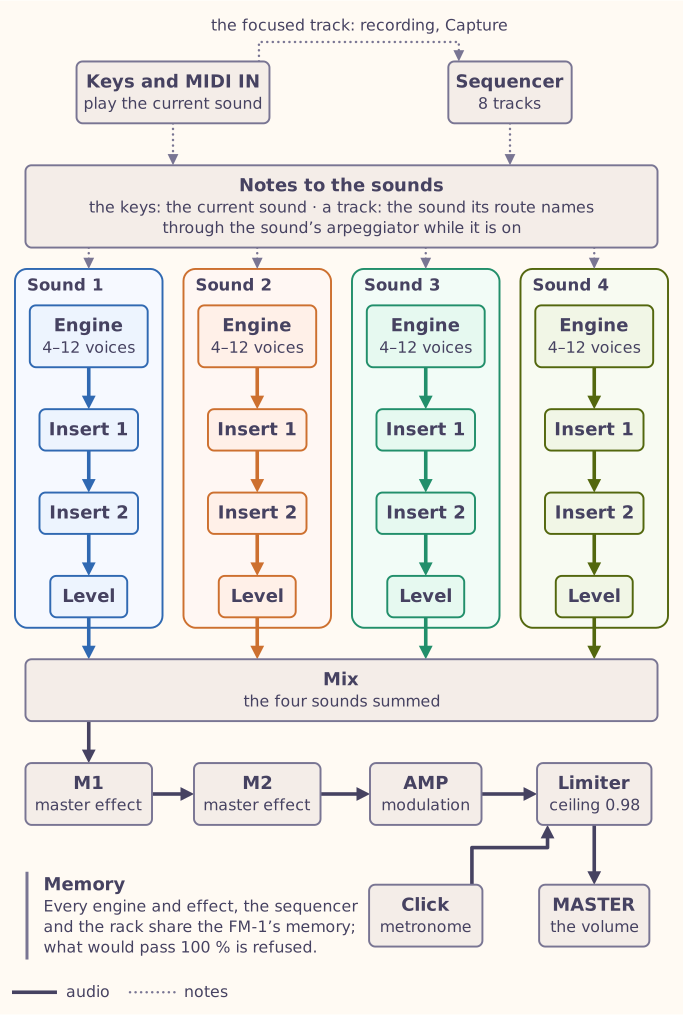
The current sound is the one the keys and MIDI IN play, and the one the sound’s page, PRESETS, ALGORITHM and the knobs edit.
- To choose it: hold SEL and turn PRESETS: Sound 1 to 4. The screen lists the four sounds and the engine each holds, such as S2 Shapes or S3 Empty, with the current one highlighted. SEL has this job everywhere but in FX mode, where it picks up effects.
- To give it an engine: turn PRESETS. On Sounds 2 to 4 the list starts with Empty, which unloads that sound.
- Once a second sound is in use, the top bar names the current one, such as S2 Shapes.
- Focusing a sequencer track makes the sound it plays the current one (chapter 7); you can choose another afterwards.
- A key you hold, or a note at MIDI IN, is released on the sound it started on, even after you choose another.
- In the simulator, the Sound (PRESETS) list under the panel is the current sound’s, and its label names it.
Each sound’s level, from 0 to 100 %, is on the Mix page in FX mode (chapter 6). Every sound counts against the FM-1’s memory, and a sound that would not fit is refused (chapter 6): Shapes twice, for one, does not fit.
In the desktop tools, --sound K:ID loads sound K, --sound-note plays a
note on it and --level K:PCT sets its level
(chapter 2).
5.3 Macro
Status:In the simulatorOn the desktopPlanned for the device
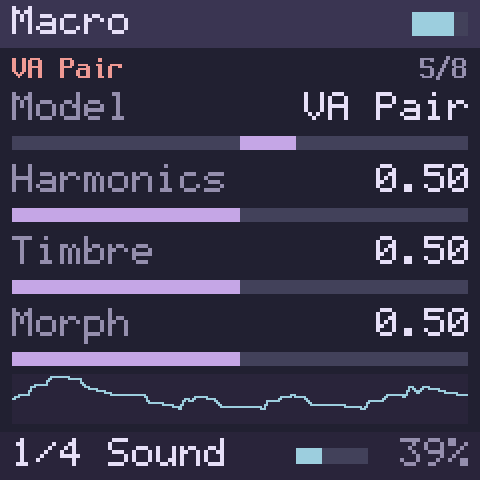
Macro is eight synthesizers in one, from Mutable Instruments Plaits: a virtual-analogue voice with a filter, phase distortion, wave terrain, a chiptune voice, a pair of analogue oscillators, a waveshaper, two-operator FM and a wavetable. Each note passes through Plaits’ low-pass gate, which ties the note’s brightness to its level, so that it darkens as it fades, as acoustic instruments do.
- Model chooses one of the eight. ALGORITHM steps through them, and so does KNOB1 on page 1. Changing the model ends the notes that are sounding.
- Harmonics, Timbre and Morph are Plaits’ three sound controls. What each one does depends on the model (below).
- Decay sets how long a note takes to fade after you let go of the key. While you hold a key, the note sustains.
- Colour sets how much the low-pass gate darkens the note as it fades: at the left the tone closes down with the level, like a plucked string; at the right only the level falls.
- Volume is the engine’s output level.
- Playing harder makes a note louder and brighter.
- Page 3 holds Plaits’ own envelope, which every note restarts and Decay shortens or lengthens:
- Env Pitch, Env Timbre and Env Morph set how far it moves the note, Timbre and Morph, from nothing in the middle to the most at either end, to the right upwards and to the left downwards. A short Decay with some Env Pitch gives a falling zap or a drum-like thump. On Chip, Env Timbre sets the arpeggio’s own fade instead: the further from the middle, the shorter each note.
- LPG chooses how the low-pass gate plays: Gate follows the key, as described above; Ping strikes the gate at each key press and lets it close over the Decay time even if you hold the key, like a plucked or struck sound; Off takes the gate out, so the note keeps its full brightness and only its level fades after you let go.
- Page 4 holds Glide, Voice Mode, Glide Mode and Time Mode: how notes slide from one to the next, and one-voice playing (chapter 4).
| Model | Harmonics | Timbre | Morph |
|---|---|---|---|
| VA+Filter: an analogue-style waveform through a resonant low-pass filter | The filter’s character: a steeper slope on the left, a gentler one on the right, and more resonance the further from the middle | The filter’s cutoff | The waveform: sawtooth on the left, square in the middle, a narrowing pulse towards the right; near either end a sub-oscillator an octave down joins in |
| PhaseDist: phase-distortion synthesis | The frequency of the distortion, in steps of musical ratios | The amount of distortion | The asymmetry of the distortion |
| Terrain: the waveform is read along a circular path over a surface | Which of eight terrains, blending between neighbours | The size of the path | Where the path sits on the terrain |
| Chip: a chiptune voice with an arpeggiator | The chord the arpeggiator plays | The arpeggio: up, down, up and down, or random, over one, two or four octaves | Below the middle, a pulse-width effect; above it, hard sync |
| VA Pair: two classic oscillators | The detuning between them | The first oscillator: from a narrow pulse to a square, then hard-sync formants | The second oscillator: from a triangle to a sawtooth with a widening notch |
| Shaper: a waveshaper and wavefolder | The waveshaper’s curve | How much the wave is folded | The waveform’s asymmetry, from triangle to sawtooth |
| 2-op FM: two operators, one modulating the other | The frequency ratio between them | The modulation amount | Feedback: towards the right the second operator modulates itself, for a rough tone; towards the left it feeds back into the first, for chaotic tones; none in the middle |
| Wavetable: banks of waveforms on an 8 × 8 grid | Which bank. In the first half of its range the waves blend smoothly; in the second they step from one to the next, for a grainier sound | The row in the bank | The column in the bank |
Chip, the arpeggiating model
Each key press on Chip plays the next note of the arpeggio, a chord built on the key you press. Strike one key repeatedly and the notes walk through the chord. Each voice keeps its own place in the pattern, so the first notes of a chord played across several keys may start at different places.
Starting points
- Bass: VA+Filter with Morph at the left, a sawtooth with its sub-oscillator, Timbre low and Decay low.
- Pads: VA Pair with Decay high, and Ensemble then Plate in the effect slots (chapter 6).
Macro’s output is mono; the effects spread it in stereo. 2-op FM is the heaviest of its models for the processor, and the others are light.
| Page | KNOB1 | KNOB2 | KNOB3 | KNOB4 |
|---|---|---|---|---|
| Page 1 | Model | Harmonics | Timbre | Morph |
| Page 2 | Decay | Colour | Volume | – |
| Page 3 | Env Pitch | Env Timbre | Env Morph | LPG |
| Page 4 | Glide | Voice Mode | Glide Mode | Time Mode |
| Parameter | Where | Type | Range | Default |
|---|---|---|---|---|
| Model | Page 1 · KNOB1 | List, 8 values | 0 – 7 | 0 VA+Filter |
| Harmonics | Page 1 · KNOB2 | Continuous | 0 – 1 | 0.5 |
| Timbre | Page 1 · KNOB3 | Continuous | 0 – 1 | 0.5 |
| Morph | Page 1 · KNOB4 | Continuous | 0 – 1 | 0.5 |
| Decay | Page 2 · KNOB1 | Continuous | 0 – 1 | 0.5 |
| Colour | Page 2 · KNOB2 | Continuous | 0 – 1 | 0.5 |
| Volume | Page 2 · KNOB3 | Continuous | 0 – 1 | 0.7 |
| Env Pitch | Page 3 · KNOB1 | Continuous | −1 – 1 | 0 |
| Env Timbre | Page 3 · KNOB2 | Continuous | −1 – 1 | 0 |
| Env Morph | Page 3 · KNOB3 | Continuous | −1 – 1 | 0 |
| LPG | Page 3 · KNOB4 | List, 3 values | 0 – 2 | 0 Gate |
| Glide | Page 4 · KNOB1 | Continuous, logarithmic | 1 – 5000 ms | 100 ms |
| Voice Mode | Page 4 · KNOB2 | List, 3 values | 0 – 2 | 0 Poly |
| Glide Mode | Page 4 · KNOB3 | List, 3 values | 0 – 2 | 0 Off |
| Time Mode | Page 4 · KNOB4 | List, 2 values | 0 – 1 | 0 Time |
Model values
- 0 VA+Filter
- 1 PhaseDist
- 2 Terrain
- 3 Chip
- 4 VA Pair
- 5 Shaper
- 6 2-op FM
- 7 Wavetable
LPG values
- 0 Gate
- 1 Ping
- 2 Off
Voice Mode values
- 0 Poly
- 1 Mono
- 2 Legato
Glide Mode values
- 0 Off
- 1 Legato
- 2 Always
Time Mode values
- 0 Time
- 1 Rate
5.4 Macro Heavy
Status:In the simulatorOn the desktopPlanned for the device
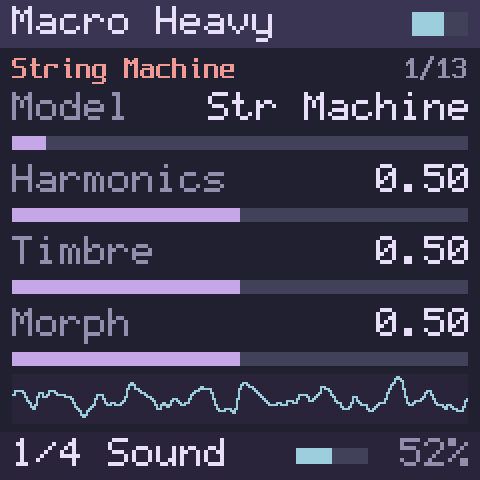
Macro Heavy holds the larger Plaits models: a string machine, chords, speech, formants, additive synthesis, a swarm of oscillators, filtered noise, particles, a modelled string, a modal resonator and three drums. Each voice needs much more memory than Macro’s, so Macro Heavy plays four notes at once.
- Model, Harmonics, Timbre, Morph, Decay, Colour and Volume work as in Macro. Changing the model ends the notes that are sounding.
- Word Speed, on page 2, sets how fast the Speech model says its words: from a quarter of the normal speed at the left, through normal at 0, to four times as fast at the right.
- Page 3 works as in Macro. On Speech, Env Pitch also lets a spoken word’s own pitch contour through. With LPG on Ping, String, Modal and the drums ring out after you let go, instead of fading.
- Page 4, Glide, Voice Mode, Glide Mode and Time Mode, works as in Macro. On Legato a string, a modal sound or a drum is not struck again when you play over a held key, and a word goes on; on Mono it is.
- String, Modal, Bass Drum, Snare and Hi-Hat sound by themselves: a key press strikes them, and they ring for as long as Morph sets. Speech, when it says words, says one word per key press. When you let go of the key, Decay and Colour set how quickly whatever is still sounding fades.
- Str Machine plays in stereo. The other models are mono.
| Model | Harmonics | Timbre | Morph |
|---|---|---|---|
| Str Machine: a string machine playing a chord on each key, through a filter and an ensemble | The chord | Brightness, with more ensemble towards either end | The registration: sawtooth footages on the left, square ones on the right |
| Chords: a chord on each key | The chord | Inversion and transposition | On the left half, mixes of square and sawtooth harmonics, like an organ or a string machine; on the right half, waveforms from a wavetable |
| Speech: vowels and words | Formant vowels, then early computer-speech vowels, then LPC vowels; above about 0.44, banks of spoken words | The size of the voice, from deep to squeaky | The vowel, or which word of the bank |
| Formant: two formants over a carrier | The ratio between the two formants | The formant frequency | The formants’ width and shape |
| Additive: a spectrum of harmonics | How many bumps the spectrum has | Which harmonic is strongest | The shape of the bumps, from flat and wide to peaked and narrow |
| Swarm: a cloud of enveloped sawtooth grains | How far the grains’ pitches scatter | How dense the cloud is | The grains’ length and overlap |
| Filt Noise: noise through a resonant filter | The filter’s response: low-pass, band-pass, high-pass | The noise’s clock rate | The resonance |
| Particle: random clicks through filters | How far the particles’ pitches scatter | How dense the particles are | Below the middle a reverberating diffuser; above it, increasingly resonant band-pass filters |
| String: a plucked, inharmonic string | Inharmonicity, or the material | The brightness of the excitation, and the amount of dust in it | How long it rings |
| Modal: a struck resonator, such as a bar, a bell or a plate | Inharmonicity, or the material | The brightness of the excitation, and the amount of dust in it | How long it rings |
| Bass Drum: an analogue-style kick | How sharp the attack is, and how much overdrive | Brightness | How long it rings |
| Snare: an analogue-style snare | The balance of tone and noise | The balance between the drum’s modes | How long it rings |
| Hi-Hat: an analogue-style hi-hat | The balance of metallic tone and noise | The cutoff of its high-pass filter | How long it rings |
Speaking a word
Set Speech’s Harmonics above the middle to choose a bank of words, and Morph to choose the word. Each key press says it once, on the key’s pitch. Word Speed makes it faster or slower without changing its pitch.
Drums on a keyboard
The drums, String and Modal ring by themselves while you hold the key, and fade over the Decay time when you let go. For short taps that still ring out, raise Decay. With four voices, a fifth note takes over one that is already sounding.
| Page | KNOB1 | KNOB2 | KNOB3 | KNOB4 |
|---|---|---|---|---|
| Page 1 | Model | Harmonics | Timbre | Morph |
| Page 2 | Decay | Colour | Volume | Word Speed |
| Page 3 | Env Pitch | Env Timbre | Env Morph | LPG |
| Page 4 | Glide | Voice Mode | Glide Mode | Time Mode |
| Parameter | Where | Type | Range | Default |
|---|---|---|---|---|
| Model | Page 1 · KNOB1 | List, 13 values | 0 – 12 | 0 Str Machine |
| Harmonics | Page 1 · KNOB2 | Continuous | 0 – 1 | 0.5 |
| Timbre | Page 1 · KNOB3 | Continuous | 0 – 1 | 0.5 |
| Morph | Page 1 · KNOB4 | Continuous | 0 – 1 | 0.5 |
| Decay | Page 2 · KNOB1 | Continuous | 0 – 1 | 0.5 |
| Colour | Page 2 · KNOB2 | Continuous | 0 – 1 | 0.5 |
| Volume | Page 2 · KNOB3 | Continuous | 0 – 1 | 0.7 |
| Word Speed | Page 2 · KNOB4 | Continuous | −1 – 1 | 0 |
| Env Pitch | Page 3 · KNOB1 | Continuous | −1 – 1 | 0 |
| Env Timbre | Page 3 · KNOB2 | Continuous | −1 – 1 | 0 |
| Env Morph | Page 3 · KNOB3 | Continuous | −1 – 1 | 0 |
| LPG | Page 3 · KNOB4 | List, 3 values | 0 – 2 | 0 Gate |
| Glide | Page 4 · KNOB1 | Continuous, logarithmic | 1 – 5000 ms | 100 ms |
| Voice Mode | Page 4 · KNOB2 | List, 3 values | 0 – 2 | 0 Poly |
| Glide Mode | Page 4 · KNOB3 | List, 3 values | 0 – 2 | 0 Off |
| Time Mode | Page 4 · KNOB4 | List, 2 values | 0 – 1 | 0 Time |
Model values
- 0 Str Machine
- 1 Chords
- 2 Speech
- 3 Formant
- 4 Additive
- 5 Swarm
- 6 Filt Noise
- 7 Particle
- 8 String
- 9 Modal
- 10 Bass Drum
- 11 Snare
- 12 Hi-Hat
LPG values
- 0 Gate
- 1 Ping
- 2 Off
Voice Mode values
- 0 Poly
- 1 Mono
- 2 Legato
Glide Mode values
- 0 Off
- 1 Legato
- 2 Always
Time Mode values
- 0 Time
- 1 Rate
5.5 Six-Op FM
Status:In the simulatorOn the desktopPlanned for the device
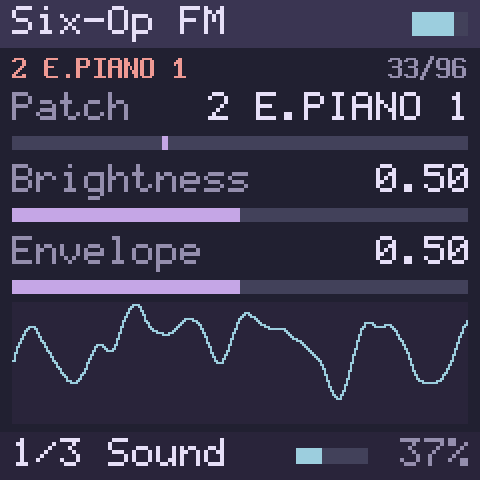
Six-Op FM is a six-operator FM synthesizer in the tradition of the classic 1980s FM keyboards, from Plaits’ six-operator engine, with the 96 patches that Plaits ships in three banks of 32. Each patch is a complete sound with its own algorithm, envelopes and velocity response. ALGORITHM steps through the patches, and the knobs adjust the one you have chosen.
- Patch chooses one of the 96. Its name starts with its bank, 1 to 3. A new patch applies to the next note you play; notes already sounding keep theirs.
- Brightness scales the modulating operators: below the middle the sound is softer, above it brighter and harsher. In the middle the patch plays as programmed.
- Envelope scales the patch’s envelope times. Attacks and decays are shorter towards the left and longer towards the right, and play as programmed in the middle. Releases play as programmed a little left of the middle, at 0.3, and grow longer either side of it: at the default, 0.5, they last about three times as long as programmed.
- Volume, on page 2, is the engine’s output level.
- Page 3 holds Glide, Voice Mode, Glide Mode and Time Mode, which slide between notes and play one voice (chapter 4). On Legato a note played over a held one does not restart the patch’s envelopes.
- Eight notes play at once.
The banks:
| Bank | Patch numbers | What is in it |
|---|---|---|
| 1 | 0 – 31 | Basses, analogue-style synthesizers, leads, textures and effects |
| 2 | 32 – 63 | Electric and acoustic pianos, clavinets, plucked strings, mallets, bells, drums and percussion |
| 3 | 64 – 95 | Organs, pads, textures, strings and brass |
Patch names
A few of the stored patch names are trademarks or a person’s name. Public builds show those patches under descriptive names of this project’s own; the sound is the same.
Shaping a patch
Turn Envelope left for snappier attacks and quicker decays, and right to slow them into swells. Brightness works like a tone control for the whole patch.
| Page | KNOB1 | KNOB2 | KNOB3 | KNOB4 |
|---|---|---|---|---|
| Page 1 | Patch | Brightness | Envelope | – |
| Page 2 | Volume | – | – | – |
| Page 3 | Glide | Voice Mode | Glide Mode | Time Mode |
| Parameter | Where | Type | Range | Default |
|---|---|---|---|---|
| Patch | Page 1 · KNOB1 | List, 96 values | 0 – 95 | 32 2 E.PIANO 1 |
| Brightness | Page 1 · KNOB2 | Continuous | 0 – 1 | 0.5 |
| Envelope | Page 1 · KNOB3 | Continuous | 0 – 1 | 0.5 |
| Volume | Page 2 · KNOB1 | Continuous | 0 – 1 | 0.7 |
| Glide | Page 3 · KNOB1 | Continuous, logarithmic | 1 – 5000 ms | 100 ms |
| Voice Mode | Page 3 · KNOB2 | List, 3 values | 0 – 2 | 0 Poly |
| Glide Mode | Page 3 · KNOB3 | List, 3 values | 0 – 2 | 0 Off |
| Time Mode | Page 3 · KNOB4 | List, 2 values | 0 – 1 | 0 Time |
Patch values
- 0 1 SOLID BASS
- 1 1 Fat Low
- 2 1 LeaderTape
- 3 1 ACID BASS
- 4 1 BASS 3
- 5 1 PLUCK BASS
- 6 1 BASS 1
- 7 1 ELEC BASS
- 8 1 S.BAS 27.7
- 9 1 RESONANCES
- 10 1 SYN-BASS 2
- 11 1 PRC SYNTH1
- 12 1 PRISM 2
- 13 1 ANALOG 4
- 14 1 ANALOG A
- 15 1 ANALOG 6
- 16 1 POLY 80
- 17 1 INSERT 1
- 18 1 SPIRAL
- 19 1 FM-TROTT
- 20 1 GASHAUS
- 21 1 RING DING
- 22 1 PAPAGAYO
- 23 1 WINEGLASS
- 24 1 SEDATIVE
- 25 1 SAMPLER 1
- 26 1 *Wavetbl 1
- 27 1 *Wavetbl 2
- 28 1 *Sampler 3
- 29 1 *Vocoder 2
- 30 1 *Sequence
- 31 1 Bounce 4
- 32 2 E.PIANO 1
- 33 2 TINE EP 1
- 34 2 WINTER EP
- 35 2 RS-EP C
- 36 2 *Tines III
- 37 2 CLAV-E.PNO
- 38 2 SYNTH CLAV
- 39 2 FUNK CLAV
- 40 2 PIANO 5
- 41 2 GRD PIANO1
- 42 2 BIG GRAND
- 43 2 GUIT ACOUS
- 44 2 SITAR
- 45 2 KOTO
- 46 2 HARPSICH 1
- 47 2 CLAV 3
- 48 2 XYLOPHONE
- 49 2 MARIMBA
- 50 2 VIBE 1
- 51 2 GLOKENSPL
- 52 2 BELL C
- 53 2 BELLS
- 54 2 TUB BELLS
- 55 2 GONG 2
- 56 2 KETTLE 6
- 57 2 MID DRM 3
- 58 2 ORI DRUM 1
- 59 2 WOOD 6
- 60 2 LATN DRM 4
- 61 2 CIMBAL
- 62 2 SYNTH DRUM
- 63 2 B.DRM-SNAR
- 64 3 CLICK 124
- 65 3 *Drawbar 1
- 66 3 E.ORGAN 3
- 67 3 60-S ORGAN
- 68 3 OPTIC 28
- 69 3 PIPES 1
- 70 3 PIPES 3
- 71 3 PIPES 2
- 72 3 POLY PAD
- 73 3 SOUNDTRACK
- 74 3 ICE PAD 2
- 75 3 LUSH PADS
- 76 3 BAROQUE 2
- 77 3 SOFT TOUCH
- 78 3 *Planets
- 79 3 CIRRUS
- 80 3 ENTRIX
- 81 3 MAL POLY
- 82 3 Textures 6
- 83 3 Etherial5a
- 84 3 'Airy'
- 85 3 BORON A
- 86 3 CINEMA 1
- 87 3 STRINGS C
- 88 3 STRINGS 3
- 89 3 STRINGS 2
- 90 3 STRINGS 7
- 91 3 FULL STRIN
- 92 3 SYN-ORCH
- 93 3 BRASS 1
- 94 3 BRASS 6 BC
- 95 3 BR TRUMPET
Voice Mode values
- 0 Poly
- 1 Mono
- 2 Legato
Glide Mode values
- 0 Off
- 1 Legato
- 2 Always
Time Mode values
- 0 Time
- 1 Rate
5.6 FM6
Status:In the simulatorOn the desktopPlanned for the device
FM6 is a six-operator FM synthesizer that plays voices in the format of the classic 1980s FM keyboards, the DX7’s: 155 parameters for six operators with their own envelopes, 32 algorithms, feedback, an LFO and a pitch envelope. Its synthesis is msfa, the FM core Google published for Android, the same core the FM-1’s own firmware runs. It comes with 32 voices of this project’s own, and plays voices you load from SysEx files (below). ALGORITHM steps through the voices, and the knobs shape the one you have chosen.
Both the engine and its name are borrowed, with thanks: the engine is Google’s msfa, and the name is that of the FM engine in hugelton’s Felucca, open firmware for the FM-1, whose port of the same core checks FM6’s sound in this project’s tests.
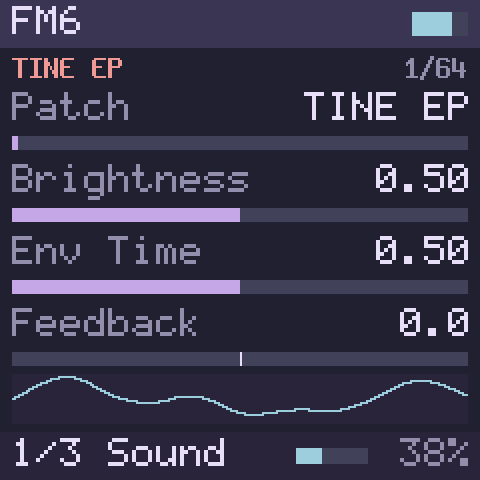
- Patch chooses a voice: the 32 built-in ones, then User 1 to User 32, which show the names of the voices you have loaded. A new voice applies to the next note you play; notes already sounding keep theirs.
- Brightness moves the level of every modulating operator, up to 24 dB down at the left and up at the right. In the middle the voice plays as programmed. The carriers, and so the loudness, do not change.
- Env Time runs all the voice’s envelopes faster or slower, the pitch envelope’s too: up to 8 times faster at the left, 8 times slower at the right, as programmed in the middle. It acts on notes that are sounding.
- Feedback adds to the voice’s own feedback, from 0 to 7 in whole steps.
- Volume, on page 2, is the engine’s output level.
- Page 3 holds Glide, Voice Mode, Glide Mode and Time Mode, which slide between notes and play one voice (chapter 4). On Legato a note played over a held one keeps the envelopes and the LFO running.
- Twelve notes play at once.
The built-in voices:
| Patch numbers | What they are |
|---|---|
| 0 – 4 | Keys: two electric pianos, a clavinet-like pluck, a harpsichord, a koto |
| 5 – 10 | Mallets and bells: marimba, vibraphone (with tremolo), tubular bell, glass bell, chimes, steel drum |
| 11 – 13 | Organs: drawbars, drawbars with a percussive click, a gritty rock organ |
| 14 – 17 | Brass and winds: brass, soft brass, flute, clarinet |
| 18 – 21 | Strings and pads: strings, warm pad, glass pad, a slow sweep |
| 22 – 24 | Basses: FM bass, plucked bass, saw bass |
| 25 – 27 | Leads: saw, square, a sync-like sweep |
| 28 – 30 | Drums: kick (play it low), snare, hi-hat |
| 31 | A pure sine, for tuning and tests |
| 32 – 63 | User 1 to User 32, named after the voices loaded into them |
5.6.1 Loading voices from SysEx
Status:In the simulatorOn the desktop
The user slots take voices from SysEx files (.syx), the format the DX7 and
its editors save: a single voice, or a bank of 32. A bank fills User 1 to
User 32; single voices go to the user slots one after another, starting
after the last one loaded. A file may hold several dumps. Values out of
range are brought into range, and anything that is not a voice dump is
skipped.
In the simulator (chapter 2):
- Power on.
- Choose Load DX7 patches… under the panel and pick one or more
.syxfiles, or drop the files anywhere on the page. - The screen shows Loaded 32 voices (or how many there were), which user slots they went to and the first voice’s name, and the status line under the panel says the same. The current sound now plays the first voice loaded: if it was another engine, it becomes FM6.
- Turn ALGORITHM to step through the voices by name. Every sound you set to FM6 later has them too.
The file is read in your browser; nothing is uploaded. The simulator checks it first: a file that is empty, is not SysEx, holds SysEx of another kind, is cut short, or holds a voice dump of the wrong length loads nothing, and the status line says which. A dump whose checksum is wrong is loaded all the same, as DX7 editors load one, and the status line says the file may be damaged. Files of up to 64 KB are read. The voices stay until you power off.
On the desktop, fm1-render --sysex FILE.syx loads files before the first
note (chapter 2), and prints the
names it found.
Voices from elsewhere
Files of DX7 voices circulate widely, Yamaha’s own factory voices among them. They are not part of Lunar Modulator, and nothing here comes with them: load only files you are entitled to use.
Two algorithms with a loop
Algorithms 4 and 6 feed a whole stack of operators back on itself, as the DX7 does; FM6 runs that loop, where msfa itself plays those two algorithms without feedback. The built-in SAW BASS uses it.
| Page | KNOB1 | KNOB2 | KNOB3 | KNOB4 |
|---|---|---|---|---|
| Page 1 | Patch | Brightness | Env Time | Feedback |
| Page 2 | Volume | – | – | – |
| Page 3 | Glide | Voice Mode | Glide Mode | Time Mode |
| Parameter | Where | Type | Range | Default |
|---|---|---|---|---|
| Patch | Page 1 · KNOB1 | List, 64 values | 0 – 63 | 0 TINE EP |
| Brightness | Page 1 · KNOB2 | Continuous | 0 – 1 | 0.5 |
| Env Time | Page 1 · KNOB3 | Continuous | 0 – 1 | 0.5 |
| Feedback | Page 1 · KNOB4 | Continuous | −7 – 7 | 0 |
| Volume | Page 2 · KNOB1 | Continuous | 0 – 1 | 0.7 |
| Glide | Page 3 · KNOB1 | Continuous, logarithmic | 1 – 5000 ms | 100 ms |
| Voice Mode | Page 3 · KNOB2 | List, 3 values | 0 – 2 | 0 Poly |
| Glide Mode | Page 3 · KNOB3 | List, 3 values | 0 – 2 | 0 Off |
| Time Mode | Page 3 · KNOB4 | List, 2 values | 0 – 1 | 0 Time |
Patch values
- 0 TINE EP
- 1 BARK EP
- 2 CLAV
- 3 HARPSI
- 4 KOTO
- 5 MARIMBA
- 6 VIBES
- 7 TUBE BELL
- 8 GLASS BELL
- 9 CHIMES
- 10 STEEL DRUM
- 11 ORGAN 1
- 12 ORGAN PERC
- 13 ROCK ORGAN
- 14 BRASS
- 15 SOFT BRASS
- 16 FLUTE
- 17 CLARINET
- 18 STRINGS
- 19 WARM PAD
- 20 GLASS PAD
- 21 SWEEP
- 22 FM BASS
- 23 PLUCK BASS
- 24 SAW BASS
- 25 SAW LEAD
- 26 SQUARE LD
- 27 SYNC LEAD
- 28 KICK
- 29 SNARE
- 30 HI-HAT
- 31 PURE SINE
- 32 User 1
- 33 User 2
- 34 User 3
- 35 User 4
- 36 User 5
- 37 User 6
- 38 User 7
- 39 User 8
- 40 User 9
- 41 User 10
- 42 User 11
- 43 User 12
- 44 User 13
- 45 User 14
- 46 User 15
- 47 User 16
- 48 User 17
- 49 User 18
- 50 User 19
- 51 User 20
- 52 User 21
- 53 User 22
- 54 User 23
- 55 User 24
- 56 User 25
- 57 User 26
- 58 User 27
- 59 User 28
- 60 User 29
- 61 User 30
- 62 User 31
- 63 User 32
Voice Mode values
- 0 Poly
- 1 Mono
- 2 Legato
Glide Mode values
- 0 Off
- 1 Legato
- 2 Always
Time Mode values
- 0 Time
- 1 Rate
5.7 Shapes
Status:In the simulatorOn the desktopPlanned for the device
Shapes is the macro-oscillator from Mutable Instruments Braids: 47 shapes, from analogue waveforms and their sync and sub-oscillator versions to formants, FM, physical models of plucked, bowed and blown instruments, bells and drums, wavetables, noise and granular textures. Each voice has its own attack and release envelope.
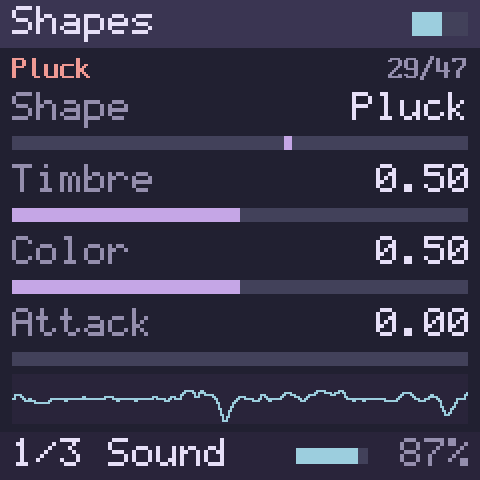
- Shape chooses one of the 47. ALGORITHM steps through them, and a new shape applies at once, to notes that are sounding too.
- Timbre and Color are the two controls Braids gives every shape; what they do depends on the shape (below).
- Attack sets how long a note takes to rise, and Release, on page 2, how long it takes to fade after you let go. Both run from 1 ms at the left to 4 seconds at the right.
- Volume, on page 2, is the engine’s output level.
- Page 3 holds Glide, Voice Mode, Glide Mode and Time Mode, which slide between notes and play one voice (chapter 4). On Legato a note played over a held one does not strike the shape again.
- Playing harder makes a note louder.
| No. | Shape | Timbre | Color |
|---|---|---|---|
| 0 | CSaw: a sawtooth with a notch | Where the notch falls | How deep it is |
| 1 | Morph: one oscillator through a filter | The waveform: triangle, sawtooth, square, then a narrowing pulse | A low-pass filter that closes, with more overdrive, as Color rises |
| 2 | Saw/Sqr | The shape of both waves | From sawtooth to square |
| 3 | Sine/Tri: a wavefolder | How much the wave is folded | From a folded sine to a folded triangle |
| 4 | Buzz: a buzzy train of harmonics | How many harmonics | A second buzz voice, detuned by up to a semitone |
| 5, 6 | Sqr Sub, Saw Sub: a wave with a sub-oscillator | The pulse width, or the sawtooth’s shape | The sub-oscillator: none in the middle, two octaves down towards the left, one octave down towards the right |
| 7, 8 | Sqr Sync, Saw Sync: two oscillators in hard sync | The pitch of the synced oscillator | The balance between the two |
| 9 – 12 | 3x Saw, 3x Sqr, 3x Tri, 3x Sine: three oscillators | The second oscillator’s interval, from two octaves down to two up, slightly detuned near the middle | The third oscillator’s interval |
| 13 | 3x Ring: three sines, ring-modulated | The second sine’s pitch | The third sine’s pitch |
| 14 | Swarm: a swarm of sawtooths | How far they are detuned | A high-pass filter |
| 15 | Comb: a sawtooth through a comb filter | The comb’s pitch | The resonance, from negative on the left to positive on the right |
| 16 | Toy: a circuit-bent, low-fidelity oscillator | The sample-rate reduction | Digital bit-mangling |
| 17 – 20 | LP Flt, Peak Flt, BP Flt, HP Flt: waveforms that sound like a resonant filter | The filter’s frequency | The shape of the wave under it |
| 21 | Vosim: two formants | The first formant’s frequency | The second formant’s frequency |
| 22 | Vowel: vowel synthesis | The vowel | The size of the voice |
| 23 | Vowel FOF: sung vowels | The vowel | The kind of voice |
| 24 | Harmonic: additive harmonics | Which harmonic is strongest | How widely the energy spreads around it |
| 25 – 27 | FM, FB FM, Chaos FM: two-operator FM, with feedback in the last two | The modulation amount | The frequency ratio |
| 28 | Pluck: a plucked string | How long it rings | Where it is plucked |
| 29 | Bowed: a bowed string | The bow’s friction | Where it is bowed |
| 30 | Blown: a reed instrument | The breath pressure | The instrument’s body |
| 31 | Flute: a flute | The breath pressure | The mouthpiece’s geometry |
| 32 | Bell: a struck bell | How long it rings | Inharmonicity |
| 33 | Drum: a struck drum | How long it rings | Brightness, from tone towards noise |
| 34 | Kick: an analogue-style kick | How long it rings | Its tone |
| 35 | Cymbal: a metallic cymbal | The filter’s frequency | The balance of metal and noise |
| 36 | Snare: an analogue-style snare | The drum’s tone | How much snare rattle |
| 37 | Wavetbl: wavetables | The position in the table | Which table |
| 38 | Wave Map: a map of waveforms | One coordinate on the map | The other coordinate |
| 39 | Wave Line: a line of waveforms | The position along the line | How the waves are drawn and joined, between smooth and stepped |
| 40 | Wave x4: four voices from wavetables | The position among the waves | The chord |
| 41 | Filt Noise: noise through a filter that follows the key | The resonance | The response: low-pass, band-pass, high-pass |
| 42 | Twin Peak: noise through two resonant peaks | The resonance | The second peak’s frequency |
| 43 | Clk Noise: stepped noise clocked by the key’s pitch | How often the random pattern repeats | How many levels it steps between, from 2 to 32 |
| 44 | Granular: a cloud of sine grains | The grains’ length | How far their pitches scatter |
| 45 | Particle: random clicks through resonant filters | How dense the particles are | How far the filters’ frequencies scatter |
| 46 | Digital: a digitally modulated carrier | The data rate | The data sent |
The struck shapes
Pluck, Bell, Drum, Kick, Cymbal and Snare are struck when you press a key and die away by themselves, however long you hold it. Release matters only if you let go before they have finished.
Memory
Shapes is the largest engine: twelve voices take 54 % of the memory the simulator allows for everything (chapter 13). With PSX Verb and Plate together as effects it does not fit, nor as two sounds at once, and the simulator refuses what would not (chapter 6). The FM-1 build may play fewer Shapes notes at once.
At the edges
Shapes keeps Braids within the range its code was written for. A note bent or offset above MIDI 127 sounds as the top of that range, on every shape. Comb’s Timbre stops where the comb reaches its lowest pitch, which only the lowest four octaves of keys get to, and sounds the same there. The last sliver of Wave Line’s Timbre (above about 98 %) plays the line’s last wave.
| Page | KNOB1 | KNOB2 | KNOB3 | KNOB4 |
|---|---|---|---|---|
| Page 1 | Shape | Timbre | Color | Attack |
| Page 2 | Release | Volume | – | – |
| Page 3 | Glide | Voice Mode | Glide Mode | Time Mode |
| Parameter | Where | Type | Range | Default |
|---|---|---|---|---|
| Shape | Page 1 · KNOB1 | List, 47 values | 0 – 46 | 0 CSaw |
| Timbre | Page 1 · KNOB2 | Continuous | 0 – 1 | 0.5 |
| Color | Page 1 · KNOB3 | Continuous | 0 – 1 | 0.5 |
| Attack | Page 1 · KNOB4 | Continuous | 0 – 1 | 0 |
| Release | Page 2 · KNOB1 | Continuous | 0 – 1 | 0.3 |
| Volume | Page 2 · KNOB2 | Continuous | 0 – 1 | 0.7 |
| Glide | Page 3 · KNOB1 | Continuous, logarithmic | 1 – 5000 ms | 100 ms |
| Voice Mode | Page 3 · KNOB2 | List, 3 values | 0 – 2 | 0 Poly |
| Glide Mode | Page 3 · KNOB3 | List, 3 values | 0 – 2 | 0 Off |
| Time Mode | Page 3 · KNOB4 | List, 2 values | 0 – 1 | 0 Time |
Shape values
- 0 CSaw
- 1 Morph
- 2 Saw/Sqr
- 3 Sine/Tri
- 4 Buzz
- 5 Sqr Sub
- 6 Saw Sub
- 7 Sqr Sync
- 8 Saw Sync
- 9 3x Saw
- 10 3x Sqr
- 11 3x Tri
- 12 3x Sine
- 13 3x Ring
- 14 Swarm
- 15 Comb
- 16 Toy
- 17 LP Flt
- 18 Peak Flt
- 19 BP Flt
- 20 HP Flt
- 21 Vosim
- 22 Vowel
- 23 Vowel FOF
- 24 Harmonic
- 25 FM
- 26 FB FM
- 27 Chaos FM
- 28 Pluck
- 29 Bowed
- 30 Blown
- 31 Flute
- 32 Bell
- 33 Drum
- 34 Kick
- 35 Cymbal
- 36 Snare
- 37 Wavetbl
- 38 Wave Map
- 39 Wave Line
- 40 Wave x4
- 41 Filt Noise
- 42 Twin Peak
- 43 Clk Noise
- 44 Granular
- 45 Particle
- 46 Digital
Voice Mode values
- 0 Poly
- 1 Mono
- 2 Legato
Glide Mode values
- 0 Off
- 1 Legato
- 2 Always
Time Mode values
- 0 Time
- 1 Rate
5.8 Sophie
Status:In the simulatorOn the desktopPlanned for the device
Sophie is a sixteen-pad metallic FM percussion synthesizer by Matt Estela, from the Schwung community. Each pad is a drum sound of its own. A hit rings for its pad’s Decay, whether or not you keep the key down.
- Sophie plays MIDI notes 36 to 51, one pad each, and ignores other notes. Its pads follow the General MIDI drum layout: 36 is the kick, 38 the snare, 42 the closed hi-hat and so on, so drum parts from other instruments play the right sounds.
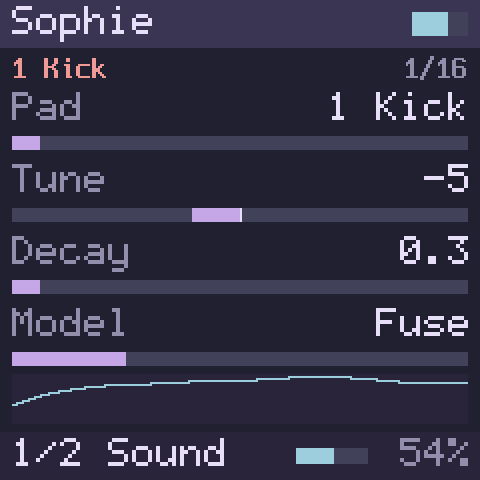
- Pad chooses which pad the other knobs edit. ALGORITHM steps through the pads, and so does KNOB1 on page 1.
- Tune sets the pad’s pitch in semitones, from two octaves down to two octaves up, relative to its key.
- Decay is how long a hit takes to die away, in seconds.
- Model chooses how the pad’s operators are wired: Fuse, two modulators in series, very responsive to feedback; Stack, a dense stack of operators; Split, operators side by side with uneven modulation; and Shard, a coarse, stepped wave mixed with noise. On pad 1, the kick, a sine body always carries the weight, and Model adds a layer over it.
- Color moves the modulators’ frequency ratios through inharmonic, clangorous zones.
- Metal sets how much the operators modulate one another: the higher, the more metallic.
- Feedback feeds the sound back into its own modulator, for a rougher edge.
- Sweep bends the start of each hit: a fast drop in pitch towards the right, a fast rise towards the left.
- Playing harder makes a hit louder. Sophie ignores pitch bend.
To play Sophie from the FM-1’s keys: play the white keys. With a drum kit as the sound (Sophie, Drums, Comet Kit or Crater Kit), the sixteen white keys play the sixteen pads at any octave, from the kick on the lowest F up to the ride on the highest white key, and the black keys play nothing. On the computer keyboard, A is the kick, S the rim, D the snare, F the clap, J the closed hi-hat, L the pedal hi-hat and ' the open hi-hat. A MIDI keyboard plays the pads on notes 36 to 51, as a drum part from another instrument expects.
The values shown after you change pads
The screen cannot read a pad’s settings back from Sophie. When you choose another pad, the screen keeps showing the values you last set. The first turn of a knob gives the new pad the value shown, plus that turn.
Sophie has further controls for each pad, for bit crushing, drive, level, a filter and a ring resonator, which this build does not show on the screen yet.
| Page | KNOB1 | KNOB2 | KNOB3 | KNOB4 |
|---|---|---|---|---|
| Page 1 | Pad | Tune | Decay | Model |
| Page 2 | Color | Metal | Feedback | Sweep |
| Parameter | Where | Type | Range | Default |
|---|---|---|---|---|
| Pad | Page 1 · KNOB1 | List, 16 values | 0 – 15 | 0 1 Kick |
| Tune | Page 1 · KNOB2 | Continuous | −24 – 24 | −5 |
| Decay | Page 1 · KNOB3 | Continuous | 0.03 – 4 | 0.28 |
| Model | Page 1 · KNOB4 | List, 4 values | 0 – 3 | 0 Fuse |
| Color | Page 2 · KNOB1 | Continuous | 0 – 100 | 24 |
| Metal | Page 2 · KNOB2 | Continuous | 0 – 100 | 8 |
| Feedback | Page 2 · KNOB3 | Continuous | 0 – 100 | 6 |
| Sweep | Page 2 · KNOB4 | Continuous | −100 – 100 | 55 |
Pad values
- 0 1 Kick
- 1 2 Rim
- 2 3 Snare
- 3 4 Clap
- 4 5 Snare 2
- 5 6 Low Tom
- 6 7 Closed HH
- 7 8 Floor Tom
- 8 9 Pedal HH
- 9 10 Mid Tom
- 10 11 Open HH
- 11 12 Low-Mid
- 12 13 High-Mid
- 13 14 Crash
- 14 15 High Tom
- 15 16 Ride
Model values
- 0 Fuse
- 1 Stack
- 2 Split
- 3 Shard
5.9 Drums
Status:In the simulatorOn the desktopPlanned for the device
Drums is a sixteen-pad drum kit after the classic analogue drum machines: a deep kick with a long boom, a short punchy one, two snares, a clap, closed, pedal and open hi-hats, six toms, a rim shot, a crash and a ride, and a cowbell you can put on any pad. Its kicks, toms, snares and hi-hats are Plaits’ drum models; the rim shot, clap, cowbell and cymbals are this project’s own, after published studies of the analogue circuits (chapter 14).
- Drums plays MIDI notes 36 to 51, one pad each, in the same order as Sophie, and ignores other notes: 36 is the kick, 38 the snare, 42 the closed hi-hat, 46 the open one, 49 the crash and 51 the ride. On the FM-1’s keys the sixteen white keys play the pads (Sophie shows which key is which).
- A hit rings for its pad’s decay, whether or not you keep the key down. Up to twelve hits sound at once. A pad struck again while it rings is struck again, as a drum is, rather than starting a second sound; a thirteenth pad takes over the quietest hit.
- A closed or pedal hi-hat cuts the open hi-hat short, as on the machines: the three hi-hats share a choke group in both kits. Any pads can share one (Choke, below).
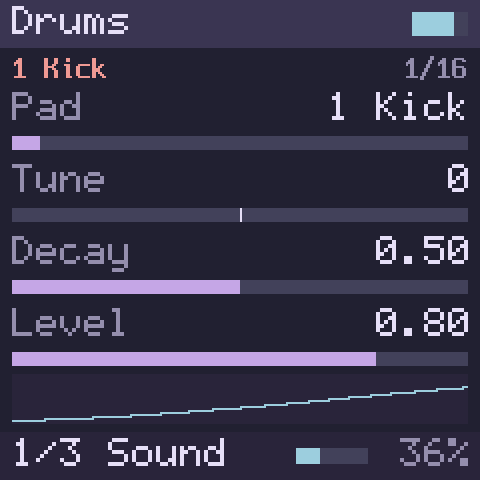
- Pad chooses which pad the pad’s knobs edit: those on pages 1 to 3. ALGORITHM steps through the pads, and so does KNOB1 on page 1. Each pad keeps its own settings.
- The pad’s knobs start in the middle, Tune at 0: that is the pad as the kit sets it up, and you turn from there. So until you change them the screen shows true values whichever pad you choose.
- Tune sets the pad’s pitch, up to two octaves either way.
- Decay sets how long it rings.
- Level sets its level in the kit.
- Tone (page 2) makes it brighter to the right.
- Snap sets the attack: the kick’s click, the snare’s wires, the hi-hats’ noise against their metal, the clap’s bursts, the rim’s click, the cymbals’ wash, the cowbell’s first clank.
- Sweep sets the fall in pitch at the start of a hit, the kick’s and the toms’ especially. On the other sounds, above the middle the hit falls in pitch, and below it rises.
- Drive saturates the pad, clean at 0.
- Model (page 3) chooses the pad’s sound. Kit is the kit’s own choice; the others are Analog Drum (a deep kick or tom), Punch Drum (a punchy, swept kick or tom), Snare, Snap Snare, Hat, Ring Hat, Cymbal, Clap, Rim and Cowbell. A pad given another sound plays that sound as Drums sets it up, so a cowbell on a tom’s pad is a cowbell.
- Choke (page 3) chooses the pad’s choke group: a hit cuts short every pad in its group that is still ringing, within a few milliseconds. Kit, the default, is the kit’s own choice: the three hi-hats share Group 1 in both kits, whatever sound their pads play, and the other pads none. None takes the pad out of any group, and Group 1 to Group 4 put it in one. Put the crash and the ride in Group 2 and each cuts the other; put a pad in Group 1 and the hi-hats cut it.
- Page 4 is the whole kit’s:
- Kit chooses Deep, the long, round kit, or Punch, harder and shorter, with a swept kick, a crisper snare and ring-modulated hi-hats.
- Accent sets how much velocity matters: at 0 every hit plays the same, at the right a soft hit is quiet and dull and a hard one loud and bright.
- Volume sets the kit’s level.
- Kit Decay makes every pad ring shorter or longer at once, each from its own Decay: in the middle the kit is as set up, to the left every pad shortens towards its shortest, to the right every pad lengthens towards its longest.
- Model, Choke and Kit reach the next hit; a hit that is ringing keeps the sound and the group it started with. The other knobs move a ringing hit too.
- Pitch bend bends every pad.
The values shown after you change pads
As on Sophie, the screen cannot read a pad’s settings back. When you choose another pad, the screen keeps showing the values you last set, and the first turn of a knob gives the new pad the value shown, plus that turn.
| Page | KNOB1 | KNOB2 | KNOB3 | KNOB4 |
|---|---|---|---|---|
| Page 1 | Pad | Tune | Decay | Level |
| Page 2 | Tone | Snap | Sweep | Drive |
| Page 3 | Model | Choke | – | – |
| Page 4 | Kit | Accent | Volume | Kit Decay |
| Parameter | Where | Type | Range | Default |
|---|---|---|---|---|
| Pad | Page 1 · KNOB1 | List, 16 values | 0 – 15 | 0 1 Kick |
| Tune | Page 1 · KNOB2 | Continuous | −24 – 24 | 0 |
| Decay | Page 1 · KNOB3 | Continuous | 0 – 1 | 0.5 |
| Level | Page 1 · KNOB4 | Continuous | 0 – 1 | 0.8 |
| Tone | Page 2 · KNOB1 | Continuous | 0 – 1 | 0.5 |
| Snap | Page 2 · KNOB2 | Continuous | 0 – 1 | 0.5 |
| Sweep | Page 2 · KNOB3 | Continuous | 0 – 1 | 0.5 |
| Drive | Page 2 · KNOB4 | Continuous | 0 – 1 | 0 |
| Model | Page 3 · KNOB1 | List, 11 values | 0 – 10 | 0 Kit |
| Choke | Page 3 · KNOB2 | List, 6 values | 0 – 5 | 0 Kit |
| Kit | Page 4 · KNOB1 | List, 2 values | 0 – 1 | 0 Deep |
| Accent | Page 4 · KNOB2 | Continuous | 0 – 1 | 0.5 |
| Volume | Page 4 · KNOB3 | Continuous | 0 – 1 | 0.7 |
| Kit Decay | Page 4 · KNOB4 | Continuous | 0 – 1 | 0.5 |
Pad values
- 0 1 Kick
- 1 2 Rim
- 2 3 Snare
- 3 4 Clap
- 4 5 Snare 2
- 5 6 Low Tom
- 6 7 Closed HH
- 7 8 Floor Tom
- 8 9 Pedal HH
- 9 10 Mid Tom
- 10 11 Open HH
- 11 12 Low-Mid
- 12 13 High-Mid
- 13 14 Crash
- 14 15 High Tom
- 15 16 Ride
Model values
- 0 Kit
- 1 Analog Drum
- 2 Punch Drum
- 3 Snare
- 4 Snap Snare
- 5 Hat
- 6 Ring Hat
- 7 Cymbal
- 8 Clap
- 9 Rim
- 10 Cowbell
Kit values
- 0 Deep
- 1 Punch
Choke values
- 0 Kit
- 1 None
- 2 Group 1
- 3 Group 2
- 4 Group 3
- 5 Group 4
5.10 Acid Bass
Status:In the simulatorOn the desktopPlanned for the device
Acid Bass is a bass after the TB-303: one voice, a sawtooth or square wave through a resonant filter swept by an envelope, with accents and slides. It is the 303 of fm1-x0x, Charles Vestal’s firmware for the FM-1, which ports Robin Schmidt’s Open303 with the Devilfish’s longer slides and accent decays and a RAT-style drive (chapter 14).
In builds with the GPL switch on
fm1-x0x’s code is published under the GNU General Public License, so Acid Bass is built in only while the firmware’s GPL switch is on: in the simulator while we test, and in firmware for the person who builds it, never in a shared build (chapter 14).
- Accent. A note played with a velocity of 100 or more is accented: louder, and with a harder sweep of the filter. Velocity does nothing else, as on the original, so play softer than 100 for a plain note.
- Slide. A key you play while holding another slides to its pitch instead of starting again: the 303’s slide. Let go of the newer key while the older one is still down and the note slides back. Let go of the last key and the note ends.
- Page 1, the filter.
- Cutoff sets how bright the note is at rest, 314 to 2,394 Hz.
- Resonance adds the squelch: at the right the filter sings.
- Env Mod sets how far each note opens the filter.
- Decay sets how long that sweep takes to close, 200 ms to 2 s.
- Page 2, the voice.
- Accent sets how hard an accented note hits.
- Wave chooses Saw or Square.
- Tune moves the pitch up to an octave either way.
- Volume sets the level.
- Page 3, drive and slides.
- Drive saturates the sound, clean at 0.
- Drive Type chooses Soft, a warm overdrive, RAT, a gritty distortion pedal, or Off.
- Slide sets how long a slide takes, 2 to 360 ms (60 ms, the original’s, to begin with).
- Acc Decay sets the filter sweep’s decay on accented notes, 30 ms to 3 s.
- Cutoff, Resonance, Env Mod, Tune, Volume, Drive and Slide move a note that sounds. Decay, Accent and Acc Decay reach the next note, a slide included. Wave and Drive Type wait for the next note that is not a slide, so they never click in the middle of one; while nothing sounds they change at once.
- Pitch bend bends the note, slides included.
- ALGORITHM steps through Wave.
Some settings to start from:
| Sound | Cutoff | Resonance | Env Mod | Decay | Accent | Drive |
|---|---|---|---|---|---|---|
| Rubber bass | 500 Hz | 40 % | 30 % | 900 ms | 40 % | 0 |
| Squelch | 420 Hz | 92 % | 85 % | 300 ms | 90 % | 0 |
| Acid lead (Square) | 1,500 Hz | 70 % | 60 % | 630 ms | 60 % | 0 |
| Distorted acid | 700 Hz | 80 % | 100 % | 400 ms | 80 % | 75 %, RAT |
| Page | KNOB1 | KNOB2 | KNOB3 | KNOB4 |
|---|---|---|---|---|
| Page 1 | Cutoff | Resonance | Env Mod | Decay |
| Page 2 | Accent | Wave | Tune | Volume |
| Page 3 | Drive | Drive Type | Slide | Acc Decay |
| Parameter | Where | Type | Range | Default |
|---|---|---|---|---|
| Cutoff | Page 1 · KNOB1 | Continuous, logarithmic | 314 – 2394 Hz | 870 Hz |
| Resonance | Page 1 · KNOB2 | Continuous | 0 – 100 | 50 |
| Env Mod | Page 1 · KNOB3 | Continuous | 0 – 100 | 50 |
| Decay | Page 1 · KNOB4 | Continuous, logarithmic | 200 – 2000 ms | 630 ms |
| Accent | Page 2 · KNOB1 | Continuous | 0 – 100 | 50 |
| Wave | Page 2 · KNOB2 | List, 2 values | 0 – 1 | 0 Saw |
| Tune | Page 2 · KNOB3 | Continuous | −12 – 12 | 0 |
| Volume | Page 2 · KNOB4 | Continuous | 0 – 1 | 0.7 |
| Drive | Page 3 · KNOB1 | Continuous | 0 – 100 | 0 |
| Drive Type | Page 3 · KNOB2 | List, 3 values | 0 – 2 | 1 Soft |
| Slide | Page 3 · KNOB3 | Continuous, logarithmic | 2 – 360 ms | 60 ms |
| Acc Decay | Page 3 · KNOB4 | Continuous, logarithmic | 30 – 3000 ms | 200 ms |
Wave values
- 0 Saw
- 1 Square
Drive Type values
- 0 Off
- 1 Soft
- 2 RAT
5.11 Comet Kit
Status:In the simulatorOn the desktopPlanned for the device
Comet Kit is a sixteen-pad drum kit after the TR-909: a kick with a punchy sweep and a beater click, a snare with its rattle of wires, three toms, a rim shot and a hand clap, all modelled on the machine’s circuits, and hi-hats, a crash and a ride played from recordings, as the machine played its cymbals. It is the 909 kit of fm1-x0x, Charles Vestal’s firmware for the FM-1, which ports 9W9 by athousanddetails, itself grown out of ER-99 by Matthew Cieplak; the cymbal recordings are ER-99’s (chapter 14).
In builds with the GPL switch on
fm1-x0x’s code and ER-99’s recordings are published under the GNU General Public License, so Comet Kit is built in only while the firmware’s GPL switch is on, as Acid Bass is (Acid Bass). Drums stays the kit every build has.
- Comet Kit plays MIDI notes 36 to 51, one pad each, in the same order as Drums and Sophie; on the FM-1’s keys the sixteen white keys play them (Sophie shows which key is which).
| Note | Pad | Sound |
|---|---|---|
| 36 | 1 Kick | the kick |
| 37 | 2 Rim | the rim shot |
| 38 | 3 Snare | the snare |
| 39 | 4 Clap | the hand clap |
| 40 | 5 Snare 2 | the snare, a little higher, with more of its wires |
| 41, 43 | 6 Low Tom, 8 Floor Tom | the low tom, and the low tom tuned up |
| 45, 47 | 10 Mid Tom, 12 Low-Mid | the mid tom, and the mid tom tuned up |
| 48, 50 | 13 High-Mid, 15 High Tom | the high tom tuned down, and the high tom |
| 42, 44 | 7 Closed HH, 9 Pedal HH | the closed hi-hat, and a longer one |
| 46 | 11 Open HH | the open hi-hat |
| 49 | 14 Crash | the crash |
| 51 | 16 Ride | the ride |
- A hit rings for its sound’s decay, whether or not you keep the key down. The kit has one voice for each of its eleven sounds, as the machine has: a sound struck again starts again, and the two pads that share a sound (the two snares, two of the toms, the closed and pedal hi-hats) cut each other. A closed or pedal hi-hat cuts the open hi-hat short.
- Velocity (page 3) sets how much a soft hit drops: at 100 % a hit at half velocity is half as loud; at 0 every hit plays at the Accent level. Accent sets the level a full-velocity hit reaches, the machine’s accent.
- Pad chooses which pad the pad’s knobs edit, those on pages 1 and 2 and Drive Type on page 3. ALGORITHM steps through the pads, and so does KNOB1 on page 1. Each pad keeps its own settings.
- The pad’s knobs are the machine’s own knobs for that sound. They start where the kit sets the pad up: Tune, Decay, Level, Tone and Snap in the middle, Sweep and Drive at 0. Turned fully left or right, a knob is at the end of that sound’s range on the machine, so a tom cannot be tuned onto another, as on the machine.
- Tune sets the pitch; on the kick, how far its pitch sweeps down at the start of a hit.
- Decay sets how long it rings; on the clap, its room tail. The snare and the rim shot have none: their length is fixed, as on the machine.
- Level sets its level in the kit.
- Tone (page 2) sets the length of the snare’s wires; on the kick, the pitch Sweep pulls it to.
- Snap sets the snare’s wires against its body, and the click of the kick and of the toms.
- Sweep works on the kick only: at 0 the kick is the machine’s; turned up, its pitch moves towards the one Tone sets, and its sweep deepens.
- Drive saturates the pad.
- Drive Type (page 3) chooses how: Diode, the machine’s own soft rounding, Clip, Saturate, Fuzz, Crunch, Fold (a wavefolder) or Crush (fewer bits and a lower sample rate).
- Kit (page 4) chooses Classic, the kit as 9W9 sets it up, or Big Beat, fm1-x0x’s own: a shorter, harder kick and a quieter open hi-hat.
- Drive Type and Kit reach the pad’s next hit; a hit that is ringing keeps the sound it started with. The other pad knobs move a ringing hit when its sound reads them, and otherwise reach the next hit.
- Comet Kit ignores pitch bend.
The values shown after you change pads
As on Drums, the screen cannot read a pad’s settings back. When you choose another pad, the screen keeps showing the values you last set, and the first turn of a knob gives the new pad the value shown, plus that turn.
| Page | KNOB1 | KNOB2 | KNOB3 | KNOB4 |
|---|---|---|---|---|
| Page 1 | Pad | Tune | Decay | Level |
| Page 2 | Tone | Snap | Sweep | Drive |
| Page 3 | Drive Type | Accent | Velocity | Volume |
| Page 4 | Kit | – | – | – |
| Parameter | Where | Type | Range | Default |
|---|---|---|---|---|
| Pad | Page 1 · KNOB1 | List, 16 values | 0 – 15 | 0 1 Kick |
| Tune | Page 1 · KNOB2 | Continuous | 0 – 1 | 0.5 |
| Decay | Page 1 · KNOB3 | Continuous | 0 – 1 | 0.5 |
| Level | Page 1 · KNOB4 | Continuous | 0 – 1 | 0.5 |
| Tone | Page 2 · KNOB1 | Continuous | 0 – 1 | 0.5 |
| Snap | Page 2 · KNOB2 | Continuous | 0 – 1 | 0.5 |
| Sweep | Page 2 · KNOB3 | Continuous | 0 – 1 | 0 |
| Drive | Page 2 · KNOB4 | Continuous | 0 – 1 | 0 |
| Drive Type | Page 3 · KNOB1 | List, 7 values | 0 – 6 | 0 Diode |
| Accent | Page 3 · KNOB2 | Continuous | 1 – 4 | 1.9921 |
| Velocity | Page 3 · KNOB3 | Continuous | 0 – 100 | 100 |
| Volume | Page 3 · KNOB4 | Continuous | 0 – 1 | 0.7 |
| Kit | Page 4 · KNOB1 | List, 2 values | 0 – 1 | 0 Classic |
Pad values
- 0 1 Kick
- 1 2 Rim
- 2 3 Snare
- 3 4 Clap
- 4 5 Snare 2
- 5 6 Low Tom
- 6 7 Closed HH
- 7 8 Floor Tom
- 8 9 Pedal HH
- 9 10 Mid Tom
- 10 11 Open HH
- 11 12 Low-Mid
- 12 13 High-Mid
- 13 14 Crash
- 14 15 High Tom
- 15 16 Ride
Drive Type values
- 0 Diode
- 1 Clip
- 2 Saturate
- 3 Fuzz
- 4 Crunch
- 5 Fold
- 6 Crush
Kit values
- 0 Classic
- 1 Big Beat
5.12 Crater Kit
Status:In the simulatorOn the desktopPlanned for the device
Crater Kit is a sixteen-pad drum kit after the TR-808: a booming kick, a snare, three toms and three congas, a clap and maracas, a rim shot and claves, a cowbell, closed and open hi-hats and a cymbal, every one the machine’s own sound. It is the 808 of fm1-x0x, Charles Vestal’s firmware for the FM-1, which ports 8W8 by athousanddetails: fifteen of the sounds are models of the machine’s circuits, built from its service notes and published analyses, and the rim shot is sc808’s (chapter 14). Drums stays beside it: two kits of its own, any sound on any pad, in every build.
In builds with the GPL switch on
fm1-x0x’s code is published under the GNU General Public License, so Crater Kit is built in only while the firmware’s GPL switch is on: in the simulator while we test, and in firmware for the person who builds it, never in a shared build (chapter 14).
- Crater Kit plays MIDI notes 36 to 51, one sound each, and ignores other notes; on the FM-1’s keys the sixteen white keys play them, from F3:
| Note | Pad | Note | Pad | Note | Pad | Note | Pad |
|---|---|---|---|---|---|---|---|
| 36 | Kick | 40 | Claves | 44 | Maracas | 48 | High Tom |
| 37 | Rim Shot | 41 | Low Tom | 45 | Mid Tom | 49 | Cymbal |
| 38 | Snare | 42 | Closed HH | 46 | Open HH | 50 | Hi Conga |
| 39 | Clap | 43 | Low Conga | 47 | Mid Conga | 51 | Cowbell |
- A hit rings for its sound’s decay, whether or not you keep the key down. Struck again while it rings, a sound is struck again in its own circuit, as on the machine.
- As on the machine, each conga is its tom’s circuit switched over: a low conga stops a ringing low tom, and the other way round. The rim shot and the claves, and the clap and the maracas, sound together freely.
- Velocity 88 is the 808’s normal hit and 127 its accent, louder and harder; between them the hit grows, and below 88 it is quieter.
- Pad chooses which pad the pad’s knobs edit: those on pages 1 and 2. ALGORITHM steps through the pads, and so does KNOB1 on page 1. Each pad keeps its own settings, and starts as the 808 is set up: Tune at 0 and the other knobs in the middle, so until you change them the screen shows true values whichever pad you choose.
- Tune sets the pad’s pitch, up to an octave either way (the toms and congas go further than the machine’s, which move two semitones).
- Decay sets how long it rings: the kick’s boom, the snare’s ring, the hi-hats’ and cymbal’s length.
- Level sets its level in the kit, up to twice the 808’s.
- Tone (page 2) shapes the kick (brighter to the right) and the snare (from its low shell to its high one); it does nothing on the other pads.
- Snap sets the kick’s attack click, the snare’s snares and the maracas’ attack; it does nothing on the other pads.
- Drive saturates the pad, clean at 0.
- Dist chooses how Drive saturates: Diode (the machine’s own rounding), Clip, Sat, Fuzz, Cubic (a biased crunch), Fold (a wavefolder) or Crush (bits and rate falling together).
- Page 3 is the whole kit’s:
- Accent sets how far below an accent a softer hit sits: at 100 %, velocity 88 is the 808’s normal hit; at 0 every hit is as loud as an accent.
- Choke sets which hi-hat cuts which: Off, Closed>Open (a closed hi-hat cuts the open one, as on the machine), or Both.
- Volume sets the kit’s level.
- Tune, Decay, Tone, Snap, Accent and Choke reach the next hit; a hit that is ringing keeps what it started with. Level, Drive and Volume move a ringing hit too. Dist waits for the pad’s next hit, so it never clicks in the middle of one.
- Pitch bend moves the hits you strike while you hold it, together with Tune up to an octave either way.
The values shown after you change pads
As on Drums, the screen cannot read a pad’s settings back. When you choose another pad, the screen keeps showing the values you last set, and the first turn of a knob gives the new pad the value shown, plus that turn.
Some settings to start from:
| Sound | Pad | Tune | Decay | Tone | Snap | Drive, Dist |
|---|---|---|---|---|---|---|
| Long boom kick | 1 Kick | −2 | 0.85 | 0.3 | 0.3 | 0 |
| Short punchy kick | 1 Kick | +3 | 0.3 | 0.7 | 0.9 | 0.3, Sat |
| Crisp snare | 3 Snare | +2 | 0.4 | 0.8 | 0.8 | 0 |
| Gritty cowbell | 16 Cowbell | 0 | 0.5 | – | – | 0.5, Fold |
| Page | KNOB1 | KNOB2 | KNOB3 | KNOB4 |
|---|---|---|---|---|
| Page 1 | Pad | Tune | Decay | Level |
| Page 2 | Tone | Snap | Drive | Dist |
| Page 3 | Accent | Choke | Volume | – |
| Parameter | Where | Type | Range | Default |
|---|---|---|---|---|
| Pad | Page 1 · KNOB1 | List, 16 values | 0 – 15 | 0 1 Kick |
| Tune | Page 1 · KNOB2 | Continuous | −12 – 12 | 0 |
| Decay | Page 1 · KNOB3 | Continuous | 0 – 1 | 0.5 |
| Level | Page 1 · KNOB4 | Continuous | 0 – 1 | 0.5 |
| Tone | Page 2 · KNOB1 | Continuous | 0 – 1 | 0.5 |
| Snap | Page 2 · KNOB2 | Continuous | 0 – 1 | 0.5 |
| Drive | Page 2 · KNOB3 | Continuous | 0 – 1 | 0 |
| Dist | Page 2 · KNOB4 | List, 7 values | 0 – 6 | 0 Diode |
| Accent | Page 3 · KNOB1 | Continuous | 0 – 100 | 100 |
| Choke | Page 3 · KNOB2 | List, 3 values | 0 – 2 | 1 Closed>Open |
| Volume | Page 3 · KNOB3 | Continuous | 0 – 1 | 0.7 |
Pad values
- 0 1 Kick
- 1 2 Rim Shot
- 2 3 Snare
- 3 4 Clap
- 4 5 Claves
- 5 6 Low Tom
- 6 7 Closed HH
- 7 8 Low Conga
- 8 9 Maracas
- 9 10 Mid Tom
- 10 11 Open HH
- 11 12 Mid Conga
- 12 13 High Tom
- 13 14 Cymbal
- 14 15 Hi Conga
- 15 16 Cowbell
Dist values
- 0 Diode
- 1 Clip
- 2 Sat
- 3 Fuzz
- 4 Cubic
- 5 Fold
- 6 Crush
Choke values
- 0 Off
- 1 Closed>Open
- 2 Both
5.13 Drawbar, Trio and Phase Bend
Status:In the simulatorOn the desktopPlanned for the device
Three engines come from Felucca, Leo Kuroshita’s open firmware for the FM-1 (Hügelton Instruments), each its own design: Drawbar, an organ; Trio, three oscillators in the style of the sound chips of the early 8-bit home computers; and Phase Bend, phase distortion. Their sound is Felucca’s own: the firmware runs Felucca’s code for them unchanged, notes, envelope and all, and plays every one of Felucca’s factory sounds for them to the sample as Felucca does (chapter 14).
In builds with the GPL switch on
Felucca is published under the GNU General Public License, so these three engines are built in only while the firmware’s GPL switch is on: in the simulator while we test, and in firmware for the person who builds it, never in a shared build (chapter 14).
What the three share:
- Eight voices. A key struck while it sounds starts again in its own voice, from where its level is. With all eight busy, a new note takes the oldest released voice, else the oldest held one, never the lowest key held.
- An envelope, Felucca’s: Attack rises to full level in its time, Decay falls to the Sustain level, and Release falls away after the key, each from 1 ms to 10 s in Felucca’s 128 steps. Velocity sets the level, and a velocity over 110 is an accent: it opens Trio’s filter and Phase Bend’s bend with the envelope.
- Volume sets the level.
- Pitch bend bends every note.
- Notes, knobs and bends take effect at the next 0.7 ms, Felucca’s control step, wherever they fall.
- They run at the FM-1’s rate, 44,100 or 44,118 samples a second, and stay off the list in a browser that runs the simulator faster, as Macro does. At 44,118 they play 0.7 cent sharp, as Felucca does on the FM-1.
5.13.1 Drawbar
Drawbar is a tonewheel organ: nine sine partials at the drawbar pitches of the organs it is after, from 16’ (an octave down) to 1’ (three octaves up).
- Drawbars chooses one of sixteen drawbar settings (registrations): Flute, Mellow, Hollow, Smooth, 3 Bar, Blues, Gospel, Rock, Tops, Clarinet, Reed, Strings, Chapel, Bright, Bass and Full. ALGORITHM steps through them.
- Sub, Body and Top pull the setting’s low bars (16’ and 5 1/3’), its middle (8’ and 4’) and its upper five down or up, by up to eight steps of about 3 dB.
- Perc adds the organ’s percussion, a decaying second or third harmonic, Soft (quieter) or Slow (longer), struck only on a note played while no other key is held, as on the organs. With it on, the 1’ bar is silent.
- Click sets the key click at the start and end of each note.
- Drive overdrives each note.
- Rotor spins a rotary speaker, Slow or Fast, or stops it (Off); it speeds up and slows down as the real one does.
- Drawbars, Sub, Body, Top, Perc, Click, Drive and Rotor move the notes that sound, without a click.
Some of Felucca’s own Drawbar sounds (Attack 1 ms, Decay 104 ms, Sustain 100 %):
| Sound | Drawbars | Perc | Click | Drive | Rotor | Release |
|---|---|---|---|---|---|---|
| Full Organ | Full | Off | 24 % | 16 % | Slow | 26 ms |
| Jazz Perc | 3 Bar | 3rd | 39 % | 6 % | Slow | 18 ms |
| Gospel | Gospel | 2nd | 47 % | 31.5 % | Fast | 26 ms |
| Soft Flute | Mellow (Body −2) | Off | 8 % | 0 | Slow | 54 ms |
| Rock Drive | Rock | Off | 55 % | 79 % | Fast | 18 ms |
| Page | KNOB1 | KNOB2 | KNOB3 | KNOB4 |
|---|---|---|---|---|
| Page 1 | Drawbars | Sub | Body | Top |
| Page 2 | Perc | Click | Drive | Rotor |
| Page 3 | Attack | Decay | Sustain | Release |
| Page 4 | Volume | – | – | – |
| Parameter | Where | Type | Range | Default |
|---|---|---|---|---|
| Drawbars | Page 1 · KNOB1 | List, 16 values | 0 – 15 | 4 3 Bar |
| Sub | Page 1 · KNOB2 | Continuous | −8 – 8 | 0 |
| Body | Page 1 · KNOB3 | Continuous | −8 – 8 | 0 |
| Top | Page 1 · KNOB4 | Continuous | −8 – 8 | 0 |
| Perc | Page 2 · KNOB1 | List, 7 values | 0 – 6 | 0 Off |
| Click | Page 2 · KNOB2 | Continuous | 0 – 100 | 31.5 |
| Drive | Page 2 · KNOB3 | Continuous | 0 – 100 | 0 |
| Rotor | Page 2 · KNOB4 | List, 3 values | 0 – 2 | 1 Slow |
| Attack | Page 3 · KNOB1 | Continuous, logarithmic | 1 – 10000 ms | 1 ms |
| Decay | Page 3 · KNOB2 | Continuous, logarithmic | 1 – 10000 ms | 103.6 ms |
| Sustain | Page 3 · KNOB3 | Continuous | 0 – 100 | 100 |
| Release | Page 3 · KNOB4 | Continuous, logarithmic | 1 – 10000 ms | 26.1 ms |
| Volume | Page 4 · KNOB1 | Continuous | 0 – 1 | 0.7 |
Drawbars values
- 0 Flute
- 1 Mellow
- 2 Hollow
- 3 Smooth
- 4 3 Bar
- 5 Blues
- 6 Gospel
- 7 Rock
- 8 Tops
- 9 Clarinet
- 10 Reed
- 11 Strings
- 12 Chapel
- 13 Bright
- 14 Bass
- 15 Full
Perc values
- 0 Off
- 1 2nd
- 2 3rd
- 3 2nd Soft
- 4 3rd Soft
- 5 2nd Slow
- 6 3rd Slow
Rotor values
- 0 Off
- 1 Slow
- 2 Fast
5.13.2 Trio
Trio plays three oscillators together, each a triangle, sawtooth, pulse or pitched noise, or a mix of two of them the way the old sound chips combined waves, with ring modulation and hard sync between them, into a filter that gets gritty when you push its resonance.
- Wave chooses one of sixteen sets of three waves and how they interact: three saws, three pulses, a pulse pair with a triangle, the combined Saw&Tri and Pulse&Saw, Pulse+Noise, Noise, the Sync sets (the second oscillator restarts with the first) and the Ring sets (the first oscillator ring-modulated by the third). ALGORITHM steps through them. A note keeps the wave it started with.
- Int 2 and Int 3 tune the second and third oscillators up to two octaves either way, in semitones; Detune pulls them apart, the second up and the third down, by up to 50 cents.
- Mode chooses the filter: Low-pass, Band-pass, High-pass or Notch. A note keeps the mode it started with.
- Cutoff (30 Hz to 16 kHz) and Resonance set the filter; its cutoff wanders a little, as the chips’ did.
- PW sets the pulse width of the pulse waves.
- Env Amt lets the envelope open (to the right) or close (to the left) the filter.
Felucca’s own Trio sounds:
| Sound | Wave | Int 2, Int 3 | Detune | Mode | Cutoff | Resonance | PW | Env Amt | Attack, Decay, Sustain, Release |
|---|---|---|---|---|---|---|---|---|---|
| Fat Bass | Saw x3 | 0, −12 | 9 | Low-pass | 643 Hz | 35 % | 50 % | 62.5 % | 1 ms, 90 ms, 47 %, 6 ms |
| Arp Lead | Pls+Pls+Tri | +12, 0 | 4 | Low-pass | 2,326 Hz | 20 % | 25 % | 12.5 % | 1 ms, 78 ms, 71 %, 9 ms |
| Sync Lead | Sync | +9, 0 | 0 | Low-pass | 1,729 Hz | 24 % | 50 % | 28.1 % | 1.2 ms, 160 ms, 79 %, 18 ms |
| Ring Bell | Ring 3 | 0, +18 | 6 | Band-pass | 3,455 Hz | 24 % | 50 % | 0 | 1 ms, 790 ms, 0 %, 331 ms |
| Chip Choir | Pulse x3 | 0, +12 | 7 | Band-pass | 643 Hz | 75 % | 31 % | 46.9 % | 160 ms, 683 ms, 87 %, 476 ms |
Felucca plays Fat Bass and Sync Lead one note at a time; Trio has no voice mode of its own, so play them one note at a time, or let the sequencer do.
| Page | KNOB1 | KNOB2 | KNOB3 | KNOB4 |
|---|---|---|---|---|
| Page 1 | Wave | Int 2 | Int 3 | Detune |
| Page 2 | Mode | Cutoff | Resonance | PW |
| Page 3 | Env Amt | Attack | Decay | Sustain |
| Page 4 | Release | Volume | – | – |
| Parameter | Where | Type | Range | Default |
|---|---|---|---|---|
| Wave | Page 1 · KNOB1 | List, 16 values | 0 – 15 | 0 Saw x3 |
| Int 2 | Page 1 · KNOB2 | Continuous | −24 – 24 | 0 |
| Int 3 | Page 1 · KNOB3 | Continuous | −24 – 24 | −12 |
| Detune | Page 1 · KNOB4 | Continuous | 0 – 50 | 6 |
| Mode | Page 2 · KNOB1 | List, 4 values | 0 – 3 | 0 Low-pass |
| Cutoff | Page 2 · KNOB2 | Continuous, logarithmic | 30 – 16000 Hz | 1566.45 Hz |
| Resonance | Page 2 · KNOB3 | Continuous | 0 – 100 | 31.5 |
| PW | Page 2 · KNOB4 | Continuous | 0 – 100 | 50.3937 |
| Env Amt | Page 3 · KNOB1 | Continuous | −100 – 100 | 0 |
| Attack | Page 3 · KNOB2 | Continuous, logarithmic | 1 – 10000 ms | 2.07 ms |
| Decay | Page 3 · KNOB3 | Continuous, logarithmic | 1 – 10000 ms | 160.2 ms |
| Sustain | Page 3 · KNOB4 | Continuous | 0 – 100 | 70.9 |
| Release | Page 4 · KNOB1 | Continuous, logarithmic | 1 – 10000 ms | 77.6 ms |
| Volume | Page 4 · KNOB2 | Continuous | 0 – 1 | 0.7 |
Wave values
- 0 Saw x3
- 1 Pulse x3
- 2 Pls+Pls+Tri
- 3 Saw+Saw+Tri
- 4 Tri x3
- 5 Saw&Tri
- 6 Pulse&Saw
- 7 Pulse+Noise
- 8 Noise
- 9 Sync
- 10 Sync Pulse
- 11 Sync 3
- 12 Ring
- 13 Ring 3
- 14 Ring+Sync
- 15 Ring+Sync P
Mode values
- 0 Low-pass
- 1 Band-pass
- 2 High-pass
- 3 Notch
5.13.3 Phase Bend
Phase Bend is phase distortion, as on the Casio CZ: a sine read through a bent phase, whose bend turns it into a sawtooth, a square, a pulse or one of three resonant waves, a sine sweeping inside a window. It is a port of CrispyZebra, the same author’s phase-distortion oscillator.
- Wave chooses the wave: Saw, Square, Pulse, Double Sine, Saw Pulse, and the resonant Reso Saw, Reso Tri and Reso Trap. ALGORITHM steps through them. Wave 2, when not Same, plays on every other cycle, alternating with the first. A note keeps the waves it started with.
- DCW sets the bend: at 0 a plain sine; turning it up brightens the wave, or, on the resonant waves, sweeps the resonance up.
- Env lets the envelope bend it further as each note starts.
- Detune (0 to 127 cents) and Line add a second line, detuned, Mixed with the first or Ring-modulated with it. A note keeps the line it started with.
- Sub adds a sine an octave down.
- Page 4 is glide’s, as on Macro: Glide, Voice Mode, Glide Mode and Time Mode slide between notes and play one note at a time (chapter 4). Nothing slides until Glide Mode is on Legato or Always.
Felucca’s own Phase Bend sounds:
| Sound | Wave, Wave 2 | DCW | Env | Detune | Attack, Decay, Sustain, Release |
|---|---|---|---|---|---|
| Brass | Saw | 24 % | 71 % | 0 | 1.8 ms, 160 ms, 71 %, 18 ms |
| Organ | Double Sine | 31 % | 0 | 0 | 1 ms, 10 s, 100 %, 9 ms |
| String | Saw, Double Sine | 39 % | 31.5 % | 12 | 18 ms, 683 ms, 79 %, 160 ms |
| Reso | Reso Saw | 47 % | 47 % | 0 | 1 ms, 160 ms, 24 %, 78 ms |
| Bell | Reso Tri | 63 % | 39 % | 0 | 1 ms, 982 ms, 0 %, 683 ms |
| Wire | Saw Pulse, Reso Tri | 55 % | 31.5 % | 7 | 2.1 ms, 331 ms, 63 %, 78 ms |
| Page | KNOB1 | KNOB2 | KNOB3 | KNOB4 |
|---|---|---|---|---|
| Page 1 | Wave | Wave 2 | DCW | Env |
| Page 2 | Detune | Line | Sub | Attack |
| Page 3 | Decay | Sustain | Release | Volume |
| Page 4 | Glide | Voice Mode | Glide Mode | Time Mode |
| Parameter | Where | Type | Range | Default |
|---|---|---|---|---|
| Wave | Page 1 · KNOB1 | List, 8 values | 0 – 7 | 0 Saw |
| Wave 2 | Page 1 · KNOB2 | List, 9 values | 0 – 8 | 0 Same |
| DCW | Page 1 · KNOB3 | Continuous | 0 – 100 | 47.2441 |
| Env | Page 1 · KNOB4 | Continuous | 0 – 100 | 50.4 |
| Detune | Page 2 · KNOB1 | Continuous | 0 – 127 | 0 |
| Line | Page 2 · KNOB2 | List, 2 values | 0 – 1 | 0 Mix |
| Sub | Page 2 · KNOB3 | Continuous | 0 – 100 | 0 |
| Attack | Page 2 · KNOB4 | Continuous, logarithmic | 1 – 10000 ms | 2.07 ms |
| Decay | Page 3 · KNOB1 | Continuous, logarithmic | 1 – 10000 ms | 160.2 ms |
| Sustain | Page 3 · KNOB2 | Continuous | 0 – 100 | 70.9 |
| Release | Page 3 · KNOB3 | Continuous, logarithmic | 1 – 10000 ms | 77.6 ms |
| Volume | Page 3 · KNOB4 | Continuous | 0 – 1 | 0.7 |
| Glide | Page 4 · KNOB1 | Continuous, logarithmic | 1 – 5000 ms | 100 ms |
| Voice Mode | Page 4 · KNOB2 | List, 3 values | 0 – 2 | 0 Poly |
| Glide Mode | Page 4 · KNOB3 | List, 3 values | 0 – 2 | 0 Off |
| Time Mode | Page 4 · KNOB4 | List, 2 values | 0 – 1 | 0 Time |
Wave values
- 0 Saw
- 1 Square
- 2 Pulse
- 3 Double Sine
- 4 Saw Pulse
- 5 Reso Saw
- 6 Reso Tri
- 7 Reso Trap
Wave 2 values
- 0 Same
- 1 Saw
- 2 Square
- 3 Pulse
- 4 Double Sine
- 5 Saw Pulse
- 6 Reso Saw
- 7 Reso Tri
- 8 Reso Trap
Line values
- 0 Mix
- 1 Ring
Voice Mode values
- 0 Poly
- 1 Mono
- 2 Legato
Glide Mode values
- 0 Off
- 1 Legato
- 2 Always
Time Mode values
- 0 Time
- 1 Rate
5.14 Test Sine
Status:In the simulatorOn the desktop
Test Sine plays a plain sine wave for each note, at a level set by velocity, with 5 ms fades in and out. It exists to test the firmware and the simulator, and has a single control, Volume. When all twelve voices are busy, it ignores further notes until one is free.
| Page | KNOB1 | KNOB2 | KNOB3 | KNOB4 |
|---|---|---|---|---|
| Page 1 | Volume | – | – | – |
| Parameter | Where | Type | Range | Default |
|---|---|---|---|---|
| Volume | Page 1 · KNOB1 | Continuous | 0 – 1 | 0.7 |